How to Use Instant Notes on iPad With Apple Pencil - MacRumorsOpen MenuShow RoundupsShow Forums menuVisit ForumsOpen Sidebar
Skip to Content

How to Use Instant Notes on iPad With Apple Pencil

by

If you have an iPad Pro, there's a new feature in iOS 11 that's designed to let you open up a new document in Notes just by tapping the Apple Pencil on the iPad's display.

The feature, Instant Notes, works even when the iPad is locked, so you can pick up the iPad and get right to writing without having to go through the hassle of unlocking the device, opening the Notes app, and creating a document.

Using Instant Notes

  1. On a locked iPad, press the Home button or the sleep/wake button to activate the display.
  2. Tap the Apple Pencil anywhere on the iPad's screen. instantnotesios11
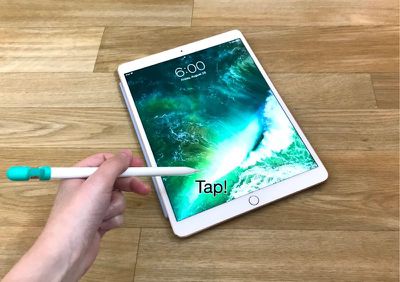
  3. Once you've tapped the Apple Pencil on the display of a locked iPad, it launches straight into the Notes app, creating a new note for you (or allowing you to edit an existing note, depending on your settings). instantnotesios11 1

Because the iPad is still locked when the Instant Notes Apple Pencil gesture is used, you can't access additional notes or any other apps until you unlock the device with Touch ID. In this locked mode, you can access all of the Notes features, including the pen tools, the document scanner, the camera, and the sketch tools.
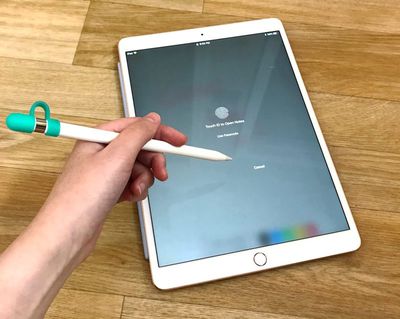
instantnotesios11locked
Instant Notes can only be activated from the Lock screen on the iPad. When the iPad is unlocked, you'll need to access your Notes through the app or through the new Notes option in the Control Center.

Turning Off Instant Notes

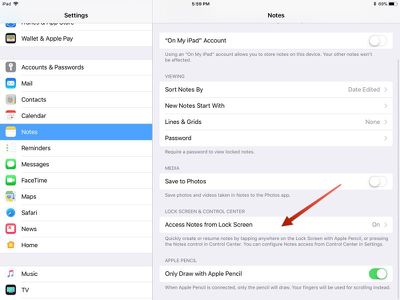
If you don't want to allow the Apple Pencil to open the Notes app, you can turn off Instant Notes in the Settings app.

  1. Open the Settings app.
  2. Scroll down to Notes and tap it.
  3. Choose "Access Notes from Lock Screen." The feature is toggled on by default. instantnotes1
  4. Select "Off."

Adjusting Instant Notes Settings

You can also adjust your Instant Notes options in the Settings app. A tap with the Apple Pencil can be set to create a new note, resume the last note created on the Lock screen, or resume the last note viewed in the Notes app.

When using the two options to resume the last note created on the Lock screen or in the Notes app, you can also set time limits. For the "Resume Last Note Created on Lock Screen" option, you can choose to automatically create a new note instead of resuming after a set time period.
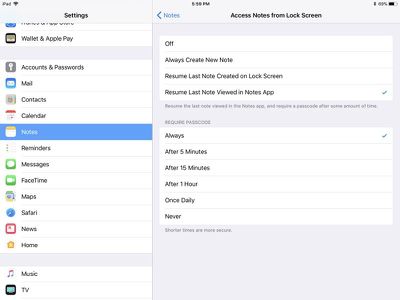
ios11instantnotes2
For the "Resume Last Note Viewed in Notes App" option, you can set a time limit after which a passcode will be required to view the note. This makes sure someone who gets a hold of your iPad can't access sensitive data.

An Apple Pencil is required to activate Instant Notes, so it only works with iPad Pro models including the 9.7-inch iPad Pro, the 10.5-inch iPad Pro, and the 12.9-inch iPad Pro.


Related Forums: iOS 11, iPad Accessories

Top Rated Comments

Billberryjuice Avatar
119 months ago
Sure it's faster, but police can use the junk shot to identify you. Junk shots are also tricky to do in a crowded cafe without attracting attention.
high risk, high reward
Score: 2 Votes (Like | Disagree)
nvbrit Avatar
119 months ago
This does NOT require an Apple Pencil and is NOT iPad only. The same feature is available from the lock screen in control center on any device running iOS 11 and works the same way

Attachment Image
Score: 1 Votes (Like | Disagree)
0098386 Avatar
119 months ago
I bloody love this new feature! It’s come in handy so many times due to its crazy fast speed loading up. Unlocking my iPad, closing whatever’s open, loading up Notes, press create new note... it’s time consuming when you need to write lots of notes.
Score: 1 Votes (Like | Disagree)
jclo Avatar
119 months ago
Great feature. Not sure the 2 steps needed that long guide lol.
Some of these how tos are more of a reminder that a feature exists. That's sort of the case with this one :)
[doublepost=1506122624][/doublepost]
Game-changing feature here! But it doesn't work well for me. As a workaround, I quickly tap 2-3 times and then I'm sure it works one of these times.
Does this happen to anyone else?
Seems to work reliably for me, but I always tap near the bottom edges. Not sure if where you tap is any kind of factor.
Score: 1 Votes (Like | Disagree)
applesith Avatar
119 months ago
Great feature. Not sure the 2 steps needed that long guide lol.
Score: 1 Votes (Like | Disagree)
tmanto02 Avatar
119 months ago
Much needed feature and something that would make using iPads in the corporate world much easier
Score: 1 Votes (Like | Disagree)

Popular Stories

iPhone Duo Apple Pencil Useful Thumb

Using an Apple Pencil With the iPhone Duo: What to Know

Friday October 23, 2026 1:49 pm PDT by
The iPhone Duo is compatible with the Apple Pencil, if you have the right one. MacRumors videographer Dan Barbera tested the Apple Pencil with the iPhone Duo to see if it's a useful tool to pick up. If you already have an Apple Pencil 1, Apple Pencil 2, or Apple Pencil Pro to use with an iPad, you're going to be disappointed to hear they won't work with the iPhone Duo. The iPhone Duo only...


iPhone Duo Apple Pencil

iPhone Duo Supports Apple Pencil Starting With iOS 27.2

Wednesday October 21, 2026 8:19 am PDT by
As noted by Creative Strategies analyst Max Weinbach, the iPhone Duo is gaining Apple Pencil support with iOS 27.2, which is expected to be released to the public next week. You can use the USB-C version of the Apple Pencil to draw, annotate, and scroll within supported apps on the iPhone Duo's inner and outer displays. In a post on X, Weinbach confirmed that Apple Pencil support was enabled...
duo aquarium

More Fun iPhone Duo Apps: 30 New Picks to Try

Friday November 6, 2026 3:27 pm PST by
When the iPhone Duo launched, we shared a list of some of the fun apps developers created for the new form factor. Two weeks out, developers are continuing to come up with fresh ideas, so we thought we'd share some of our favorites. Games Marbles Unhinged ($2.99) - Marbles Unhinged is a marble maze designed for the Duo. When you fold it, the floor turns into a ramp. If you stand the top...
Latest Stories
Apple Store Subscription Sign-Up Controversy Exposed
6 hours ago
Siri AI Rumored to Become 'More Like an Agent' as Early as Next Year
16 hours ago
Apple Taking New Approach to Developing iOS 28 and macOS 28
18 hours ago
Early Apple Black Friday Deals on Apple Watch, MacBook Air, and More
2 days ago
'Backglow' Lets You Customize New MacBook Pro's Glowing Apple Logo
2 days ago
Top Stories: Apple Product Launches, iOS 27.3 Beta, and More
2 days ago
More Fun iPhone Duo Apps: 30 New Picks to Try
2 days ago
Hands-On With Apple's New OLED Touchscreen MacBook Pro
2 days ago
Apple Store With All-New Design Opening Soon in Southern California
3 days ago
Control the Glowing Apple Logo on Your New MacBook Pro
3 days ago
Apple Shares New 'Apple Card: Apply and Use in Minutes' Ad
3 days ago
Apple Says More Than 100,000 Apps Optimized for iPhone Duo, Here's What's Still Missing
3 days ago
Early Black Friday Deals Kickoff With Steep Discounts on Apple Watch Ultras and More
3 days ago
The MacRumors Show: iOS 27.3 Looks Like a Huge Update
3 days ago
Best Buy's Black Friday Event Begins With Sitewide Savings on Apple, TVs, More
3 days ago
Apple Releasing Yet Another Two New Products Next Week
3 days ago
MacBook Air Drops to Lowest Price in Months With Amazon's $250 Discount
3 days ago
Apple Rumored to Drop the iPhone's Action Button Next Year
3 days ago
Apple's Extended Return Policy Now in Effect for 2026 Holiday Season
3 days ago
Apple Music Classical Updated With New Icon and Refreshed Design
3 days ago
OLED iPad Mini, M6 iMac, and New MacBook Pros Available From Today
3 days ago
Apple Surveys iPhone Duo Buyers About Crease and Camera
3 days ago
Apple's First Touchscreen Mac is Now Arriving to Customers
3 days ago
Claude Gets Personal Finance Feature With Bank Account Linking
3 days ago
Apple Arcade Adds Crossy Road Rush and NBA 2K27
3 days ago
Apple's New HomeView Smart Home Hub: Here's How Much RAM It Has
4 days ago
iPad Mini vs. iPad Air Buyer's Guide: Now Just $50 Apart
4 days ago
First iOS 27.3 and macOS Golden Gate 27.3 Public Betas Now Available
4 days ago
Apple Announces a New Mac Sales Record
4 days ago
Paid $200 for Logic Pro? Apple Says You Won't Get This New Feature
4 days ago