iOS 17 Lock Screen Features: StandBy and Interactive Widgets - MacRumorsOpen MenuShow RoundupsShow Forums menuVisit ForumsOpen Sidebar
Skip to Content

iOS 17 Lock Screen Features: StandBy and Interactive Widgets

With iOS 16, Apple introduced a whole new look for the Lock Screen complete with widgets and customizability, and in iOS 17, the Lock Screen was further refined. Widgets are more useful than ever before, and there's a new StandBy mode that turns your iPhone into an information hub when it's not in use.
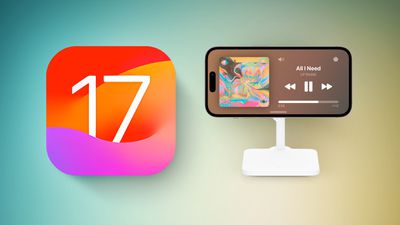
iOS 17 Lockscreen Feature
This guide highlights everything that's new with the Lock Screen in iOS 17.

StandBy

StandBy is a Lock Screen mode that activates when an iPhone is plugged into a charger and positioned in a horizontal (or landscape) orientation. It works with a MagSafe charger, which is arguably the most useful way to use it, but it also activates with a Qi-based wireless charger or a Lightning charger.


If you have an Apple Watch, it's similar to Nightstand mode, but it does more than Nightstand mode is capable of.

There are several different StandBy screens that you can choose from, some of which are customizable and some of which require unlocking the iPhone.

  • Dual Widget Stacks - With this StandBy screen, you can swipe through widgets of your choice. You can set up two separate widget stacks with multiple Home Screen widgets, displaying two sets of information side by side. You can customize the widgets in each stack, and swipe through each side individually to change them.
  • Photos - One of the StandBy screens shows content from your Photo Library, with the current time overlaid in the top right corner. You can see the date and location of the photo if you tap, and using this requires the iPhone to be unlocked so no one can see your images without your permission. You can swipe to change between themes like Favorites, Nature, Pets, Cities, and People. You can hide any themes that you don't like, and add additional albums.
  • Time - The time StandBy screen displays the time and information like the current weather, the date, or when your next alarm is set for. You can select digital or analog time, and there are four digital themes including standard Digital, World, Solar, and Float. Float shows the time in big bubble numbers in customizable colors, Solar has more of a standard font with a solar flare design in different colors, and World shows the time with a map of the world and your current location highlighted. The Analog theme has customizable accent colors, and Digital has bold numbers with different color options.

With all of these StandBy screens, you can swipe left or right to swap between one of the three display options, and then you can swipe up and down to choose what's displayed. So if you've set up different Time screens, for example, you can swipe to change between digital and analog.

Notifications

Incoming notifications will be shown full screen when you have your iPhone in StandBy mode. So if you get an iMessage, for example, it will pop up with the name of the person and the Messages icon to let you know you have a message.
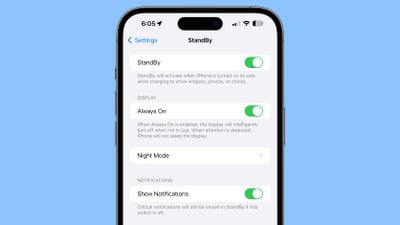
standby ios 17 show notifications
Content that would not normally be shown in a notification will not show up in StandBy mode unless you are nearby and have unlocked your device with Touch ID or Face ID.

Customizing StandBy

On any of the StandBy screens, you can long press to open options for customizing what you see. Long press on either of the widgets on the widget screen, for example, and you can choose the widgets that you want to see.

There are customization options for almost all of the StandBy display options, and it's worth swiping through and long pressing where applicable to change your setup to meet your needs.

Always-On StandBy

With the iPhone 14 Pro and iPhone 14 Pro Max (and future iPhones), StandBy is more useful because of the always-on display. StandBy content is always on and active on these devices, without the need to interact with the iPhone.

On iPhones without always-on display technology, you need to tap the screen to activate it because it turns off after a short period. You can use StandBy with all iPhones, but it is a better experience with the always-on display.

Interactive Widgets

Lock Screen widgets were introduced with iOS 16, but in iOS 17, they're interactive, making them much more useful. On iOS 16, tapping a Lock Screen widget launches the accompanying app, but that step is not necessary for certain widgets that have tasks you can complete without an app.
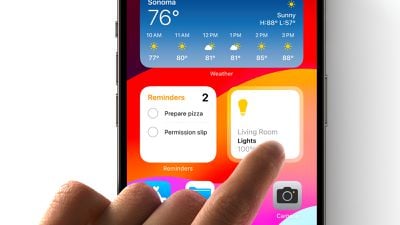
iOS 17 Interactive Widgets
You can check off a task right in the Reminders widget, for example, or use the Home widget to control a smart home device without opening the Home app. Apple apps have interactive features, and third-party developers have an API to adopt interactivity too.

Interactive widgets are available on the Lock Screen and the ‌Home Screen‌, so they can do more wherever you're using them.

Read More

More information about the new features in iOS 17 can be found in our iOS 17 roundup.

Related Forums: iOS 17, iPadOS 17

Popular Stories

duo aquarium

More Fun iPhone Duo Apps: 30 New Picks to Try

Friday November 6, 2026 3:27 pm PST by
When the iPhone Duo launched, we shared a list of some of the fun apps developers created for the new form factor. Two weeks out, developers are continuing to come up with fresh ideas, so we thought we'd share some of our favorites. Games Marbles Unhinged ($2.99) - Marbles Unhinged is a marble maze designed for the Duo. When you fold it, the floor turns into a ramp. If you stand the top...


apple pro tell logo

Apple Launching Five New Products Today

Thursday November 5, 2026 12:59 am PST by
Apple is launching five new products on Friday, November 6, following pre-orders that opened last week, including its first touchscreen MacBook Pro models. The following new products will be available from today: iPad mini with OLED display and A20 Pro chip iMac with M6 chip 14-inch MacBook Pro with M6 chip 14-inch MacBook Pro with OLED touchscreen 16-inch MacBook Pro with OLED...
iOS 28 AI

Apple Taking New Approach to Developing iOS 28 and macOS 28

Sunday November 8, 2026 7:42 am PST by
Apple has made a change to its development process for iOS 28, macOS 28, and corresponding software updates, according to Bloomberg's Mark Gurman. In his Power On newsletter today, he said Apple separates development of each year's new operating systems into three major stages. Typically, he said each stage consists of four weeks of coding followed by a four-week "convergence" period where...

Top Rated Comments

TheYayAreaLiving 🎗️ Avatar
44 months ago
I love StandBy Mode. It is such an amazing feature! Hands down! 🤩
Score: 11 Votes (Like | Disagree)
44 months ago
What is the brand of charging stand in the pictures?
Score: 7 Votes (Like | Disagree)
44 months ago
Really hoping they add some flexibility for phones without always on display. There should at least be an option to extend the screen timeout to 15-30 minutes or more. It's on a charger, aside from burn-in there's no reason not to leave it on for a long time, and that still applies to always on displays so they've already taken that into consideration. Not really any reason for this not to work the same on all phones.
Score: 5 Votes (Like | Disagree)
azentropy Avatar
44 months ago
Standby would sure be a killer feature if it was available on older iPads.
Score: 4 Votes (Like | Disagree)
44 months ago
The iPhone features will be pretty useless unless they bring them to iPhoneOS 17.
Score: 4 Votes (Like | Disagree)
StealthRider Avatar
44 months ago

Can anyone recommend a good charging stand that will charge all 3 products (iPhone [MagSafe], Watch, and AirPods [either MagSafe or Lightning])?
+Mainly for stand by (able to rotate phone)
I love the Belkin BoostCharge Pro series - I have the 3-in-1 and it's great. Not cheap, but very nice.

https://www.belkin.com/3-in-1-wireless-charger-with-official-magsafe-charging-15w/WIZ017ttWH.html
Score: 4 Votes (Like | Disagree)
Latest Stories
Apple Store Subscription Sign-Up Controversy Exposed
4 hours ago
Siri AI Rumored to Become 'More Like an Agent' as Early as Next Year
14 hours ago
Apple Taking New Approach to Developing iOS 28 and macOS 28
16 hours ago
Early Apple Black Friday Deals on Apple Watch, MacBook Air, and More
1 day ago
'Backglow' Lets You Customize New MacBook Pro's Glowing Apple Logo
1 day ago
Top Stories: Apple Product Launches, iOS 27.3 Beta, and More
2 days ago
More Fun iPhone Duo Apps: 30 New Picks to Try
2 days ago
Hands-On With Apple's New OLED Touchscreen MacBook Pro
2 days ago
Apple Store With All-New Design Opening Soon in Southern California
2 days ago
Control the Glowing Apple Logo on Your New MacBook Pro
2 days ago
Apple Shares New 'Apple Card: Apply and Use in Minutes' Ad
3 days ago
Apple Says More Than 100,000 Apps Optimized for iPhone Duo, Here's What's Still Missing
3 days ago
Early Black Friday Deals Kickoff With Steep Discounts on Apple Watch Ultras and More
3 days ago
The MacRumors Show: iOS 27.3 Looks Like a Huge Update
3 days ago
Best Buy's Black Friday Event Begins With Sitewide Savings on Apple, TVs, More
3 days ago
Apple Releasing Yet Another Two New Products Next Week
3 days ago
MacBook Air Drops to Lowest Price in Months With Amazon's $250 Discount
3 days ago
Apple Rumored to Drop the iPhone's Action Button Next Year
3 days ago
Apple's Extended Return Policy Now in Effect for 2026 Holiday Season
3 days ago
Apple Music Classical Updated With New Icon and Refreshed Design
3 days ago
OLED iPad Mini, M6 iMac, and New MacBook Pros Available From Today
3 days ago
Apple Surveys iPhone Duo Buyers About Crease and Camera
3 days ago
Apple's First Touchscreen Mac is Now Arriving to Customers
3 days ago
Claude Gets Personal Finance Feature With Bank Account Linking
3 days ago
Apple Arcade Adds Crossy Road Rush and NBA 2K27
3 days ago
Apple's New HomeView Smart Home Hub: Here's How Much RAM It Has
3 days ago
iPad Mini vs. iPad Air Buyer's Guide: Now Just $50 Apart
3 days ago
First iOS 27.3 and macOS Golden Gate 27.3 Public Betas Now Available
4 days ago
Apple Announces a New Mac Sales Record
4 days ago
Paid $200 for Logic Pro? Apple Says You Won't Get This New Feature
4 days ago









































