Magnifier in iOS 14 Gets Overhauled UI and New Features, Can Be Added to Home Screen - MacRumorsOpen MenuShow RoundupsShow Forums menuVisit ForumsOpen Sidebar
Skip to Content

Magnifier in iOS 14 Gets Overhauled UI and New Features, Can Be Added to Home Screen

In every version of iOS, Apple adds new Accessibility features and improves others, and iOS 14 is no exception. The Magnifier tool, designed by those with visual issues who need assistance, has new capabilities in iOS 14.
magnifier1

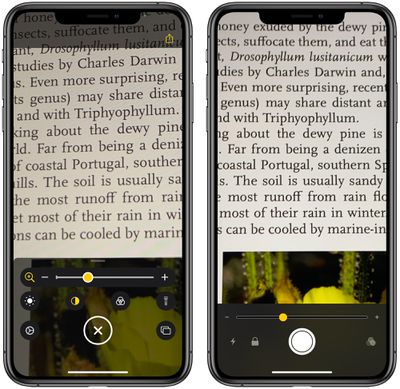
iOS 14 Magnifier interface on left, iOS 13 Magnifier interface on right

Updated Interface

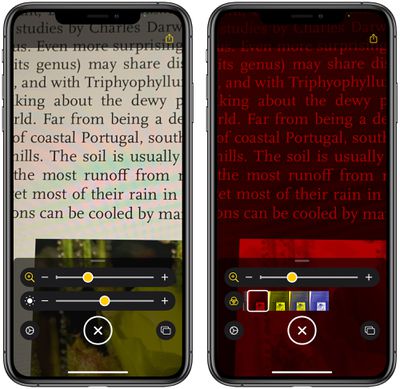
The app features an updated interface that makes controls more readily available and offers clarity on what each tool does. There are options for adjusting brightness and contrast, or adding a filter to change what's being magnified to a color that's easier for an individual to see.
magnifier2
All of the controls can be rearranged to best meet a user's needs, and the filter options can be customized so you can set the one that you need and toggle it on with a tap.

In a dark area, the flashlight can be toggled on with a tap, and the magnification level can be easily controlled with a slider bar. Many of these features were available in the prior version of the app, but multi-shot, an option for capturing more than one photo at once, is new.

Multi-Shot

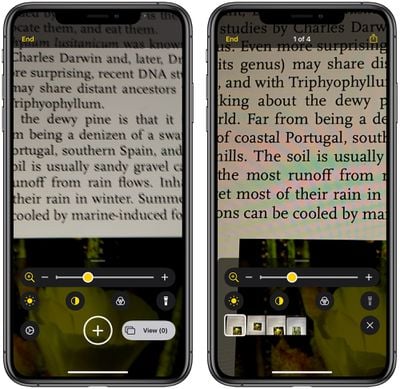
With a new multi-shot option, Magnifier users can take multiple photos at one time, capturing something like different pages of a menu, and then review them all at once, rather than having to take single shots that need to be reviewed one by one.
magnifier4

Adding Magnifier to Home Screen

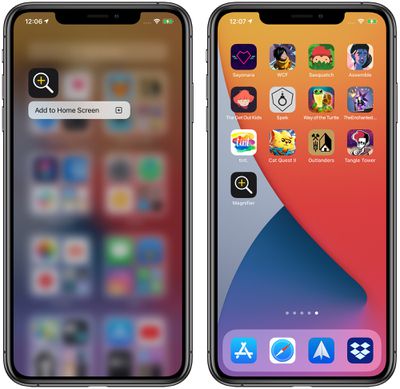
For frequent Magnifier users, an app icon to activate the Magnifier function can be added to the Home Screen by accessing the App Library, searching for Magnifier, and then dragging it over to one of the app pages or long pressing and choosing "Add to ‌Home Screen‌." The feature can continue to be accessed with a triple tap on the side button as well.
magnifier3
To find Magnifier in App Library, make sure it's turned on by opening up Settings, tapping on Accessibility, choosing Magnifier, and then toggling it to the on position.

More Accessibility Info

The changes to the Magnifier app are small but significant, making the app customizable for each user and streamlining the use process. Apple also added several useful new Accessibility features to iOS 14, such as Back Tap for manually activating some iPhone features and Sound Recognition for recognizing sounds like water running, sirens, alarms, and more. Additional detail on the new Accessibility features can be found in our iOS 14 roundup.


Related Forum: iOS 14

Popular Stories

iOS 27 Next to iPhone

Here's When iOS 27 Rolls Out Today in Every Time Zone [Update: It's Out]

Sunday September 13, 2026 3:00 am PDT by
Update 10:04 a.m.: iOS 27 is rolling out now, though it may take a bit for all users to see it, so keep checking! Apple is about to release iOS 27, which will finally deliver more advanced Siri AI capabilities as well as a variety of other refinements, improvements, and new features to iPhones. It's Apple's biggest software update of the year, and Apple announced at Wednesday's iPhone event...
iOS 27 Icon iPhone

iOS 27 Available Now With These 8 New Features

Monday September 14, 2026 9:00 am PDT by
Update — 10 a.m. Pacific Time: Apple has released iOS 27. During its iPhone 18 Pro and iPhone Duo event last week, Apple announced that iOS 27 will be released widely on Monday, September 14. iOS 27 should be available around 10 a.m. Pacific Time / 1 p.m. Eastern Time today via the Settings app, under General → Software Update. Below, we have highlighted eight new features and...
Apple iCloud Plus expansion hero

iCloud+ Now Includes Apple TV, Apple Arcade, and Curated Apple Music Stations in Over 100 Countries

Tuesday September 15, 2026 1:43 am PDT by
Apple today announced a new subscription initiative that turns paid iCloud+ subscriptions into a broader services bundle in more than 100 countries. In select countries, Apple says every paid iCloud+ plan, including the cheapest 50GB tier, now includes Apple TV and Apple Arcade "at no additional cost," while family sharing extends the storage, TV and Arcade access to up to five people....

Top Rated Comments

Chester Stone Avatar
81 months ago
Why is the newer (iOS 14) graphic always on the left in your articles? 🤔

It's easier to understand progression by putting old on left, new on right, because our eyes are reading the words from your article left-to-right.

It's as if you post the new graphic for readers, then think, "Oh, I need to compare what this used to be like," and, as an afterthought, post the second image. But for those of us that didn't even know the original feature was there, we look at the two photos and can't tell old from new. (esp. if the new looks subjectively worse)

This is confusing for your readers. When you give your writing an edit pass, please think about how readers will consume it.
Score: 18 Votes (Like | Disagree)
rk-apple Avatar
81 months ago
Every year I use magnifier more and more...
Score: 7 Votes (Like | Disagree)
zorinlynx Avatar
81 months ago
Magnifier is such a useful feature, I always wondered why it was hidden away so much. Glad to see it getting some attention and that it's being brought to the forefront!
Score: 7 Votes (Like | Disagree)
MacCheetah3 Avatar
81 months ago

Magnifier opens on triple clicking my home button.

What replaced triple click on iPhones without home button?
Side button triple press.
Score: 2 Votes (Like | Disagree)
81 months ago

... I have other apps that can do that now and also tell you what denomination of money you are holding.
sounds good if yr app could work with minimal user input.

like:
1 open app
2 input how much you have in the foreign currency (this is the only user input)
3 wave iPhone above the currency to understand what currency it is
4 provides a graph of how that currency has changed over the course of a preset number of months
5 app converts the amount of foreign currency to a preset other currency (like USD or whatever).

worth: about USD 6 in app store.
will sell 100's of thousands.
Score: 1 Votes (Like | Disagree)
JosephAW Avatar
81 months ago
I'm still waiting for a live OCR where you wave your magnifier over part of a page of text and when it stitches the entire page together in memory it can read it back to you. That and object recognition. I have other apps that can do that now and also tell you what denomination of money you are holding.
Score: 1 Votes (Like | Disagree)