

Messages, one of the quintessential apps on the iPhone, iPad, and Mac, is the home of iMessages, Apple's exclusive device-to-device messaging protocol indicated by those well-known blue chat bubbles.
If you're an iPhone user you know how the Messages app works, but in iOS 13, the Messages app is getting some useful new features that are worth highlighting. Read on for a rundown of everything that's new, and check out our list of how tos for instructions on how to use all of the new features.

User Profiles
Messages in iOS 13 lets you add a photo of yourself (or an Animoji) and a name that's shared with people when you message them. This lets people know who you are even if you're not in their contacts list, and for your contacts, it adds a photo and your specified name.
You can set your Messages profile to share with Contacts Only, to always ask before sharing with someone, or to automatically share with anyone you message with.
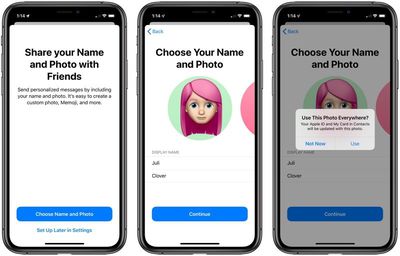
- How to Create a Custom iMessage Profile in iOS 13
- How to Change Who Sees Your Messages Profile in iOS 13
Revamped Search Capabilities
Messages has had a search feature for a long time, but it's not particularly useful. That's changing in iOS 13 with an entirely new search interface and new search capabilities.
The search interface, accessible by swiping down on the main Messages screen and tapping the search bar, brings up a list of recent contacts, links you've received in Messages, photos people have sent you, locations shared with you, and attachments you've received.
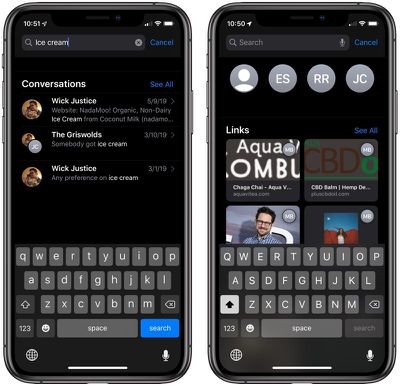
Search itself is more functional, offering up a full list of results organized by date for a given search term, without grouping those results by person. For example, if you search for "cats" and had multiple cats conversations with someone, each incident with the cats search term is listed individually in iOS 13, which is not the case in earlier versions of iOS.
Messages Info Pane
When you tap on the "i" icon at the top of a conversation with someone, there are new sections that let you get a better look back at the kinds of media that's been shared.
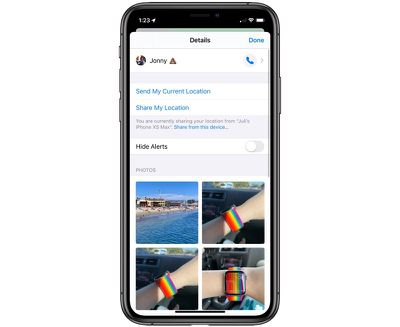
There are separate sections for photos, links, attachments, and locations.
New Memoji Customization Options
iOS 13 adds new customization options for Memoji, which are the animated, emoji-like characters that you can customize to look like yourself and other people.
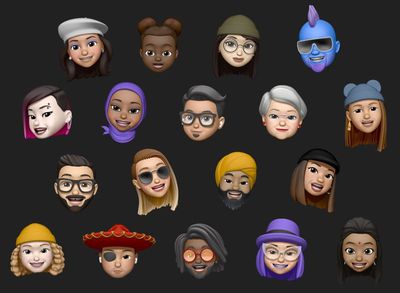
There are new options for makeup, teeth, piercings, earrings, headwear, and glasses, along with more hair styles and additional colors to add to hair and other accessories.
Memoji are available devices with a front-facing TrueDepth camera and animate based on your own facial expressions. Memoji, like Animoji, can be used for animated videos with your own voice, and in iOS 13, there are also new sticker options.
Animoji and Memoji Stickers
Apple has added a number of different Animoji and Memoji stickers with classic emoji-like poses and faces, such as heart eyes, brain exploding, shushing face, laughing with tears, crying, shrugging, face palm, and more.
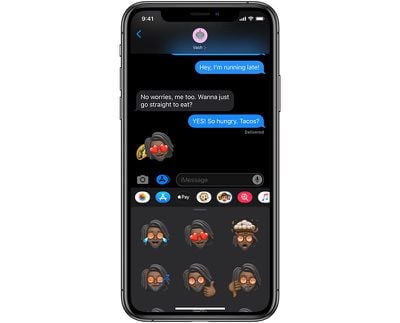
With Memoji, these new stickers are similar to something like Bitmoji, letting you express yourself with a character that looks like you through a series of stickers. The Animoji are more detailed than a traditional emoji and feature the same Animoji characters but in emoji form.
Animoji and Memoji stickers are available in the Messages app pane at the bottom of any Messages conversation. Just tap on the App Store icon and then choose the icon that looks like multiple Memoji faces.

Memoji and Animoji are limited to Apple's newest iPhones, but Animoji and Memoji stickers are more universal and can be used on all Apple devices with an A9 chip or later.
While Memoji and Animoji stickers are accessible in the Messages app, you can also use them in other places like Mail and Notes through the emoji icon on the keyboard.
New Animoji
Animoji are animated, 3D emoji characters that you can control with your face. Like Memoji, Animoji use the TrueDepth front-facing camera on modern devices, with more than 50 muscle movements in different areas of the face monitored to replicate facial expressions and emotion.

There are more than 20 Animoji characters that have been added over the last couple of years, and iOS 13 includes three more: a mouse, an octopus, and a cow.
Dual-SIM Support
iMessages in iOS 13 adds support for two phone numbers when using the dual-SIM functionality available in the iPhone XS, XS Max, and XR. There's no longer a need to choose a number to use with iMessage - both will work. Users can select which number to choose when starting a new conversation, and can swap between them when composing a new message.
Guide Feedback
Have questions about Messages, know of an iOS 13 feature we left out, or or want to offer feedback on this guide? Send us an email here.



















Top Rated Comments
The only annoyance I've had with it was the many taps and awkward positioning of buttons to add a photo into a conversation. The iOS 12 process is more awkward than prior versions, so I hope they address that with iOS 13.
And enough with the notch complaints. It's a non-issue for anyone with a phone that has one. Seriously.
I will take secure iMessage over the latest rage.
I appreciate the new search function. The other sticker type stuff is for teens.
Maybe overseas people use Whatsapp, but 1) it's owned by Facebook which is a hard pass and 2) absolutely zero people I know use it here in the US.
The beauty of the Messages app is that no matter what platform people are on, I can still message with them and see everything in one app, on my Mac, iPhone or iPad, all unified. The Android people get green SMS bubbles. Big deal.