Auto-Delete Old Messages Chats on iPhone - MacRumorsOpen MenuShow RoundupsShow Forums menuVisit ForumsOpen Sidebar
Skip to Content

Auto-Delete Old Messages Chats on iPhone

by

Deleting old messages from your iPhone or iPad is a good way to save on your device's storage space, but going back through your old conversations and deleting them individually would be a tedious and long-winded process.
General Apps Messages
Fortunately, there's a simpler way to say goodbye to old messages in iOS – Apple's mobile operating system can be automated to discard messages that have been on your device for longer than a specific period of time.

For example, it's possible to have iOS automatically remove any conversations that are older than 30 days, or any messages more than a year old. You can choose your preferred cut-off for old messages by following the steps below. Note that when messages are removed from your device, they're gone for good.

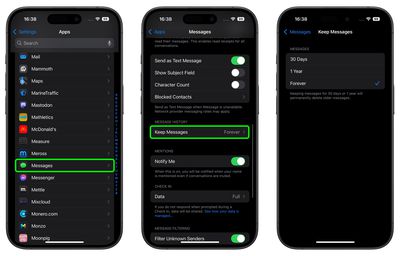
  1. Launch the Settings app on your iPhone or iPad.
  2. Scroll down and tap Apps at the bottom, then tap Messages.
  3. Under "Messages History," tap Keep Messages.
  4. Select from the options: 30 days, 1 Year, or Forever.
  5. Tap Delete to confirm.

settings

Remember, you can optionally store messages in iCloud, where you'll be able to access them from any device without taking up storage.


Popular Stories

ios 27 messages

Apple Intelligence Introduces Contextual Call and Messages Features

Monday June 8, 2026 12:49 pm PDT by
Apple today announced a set of new communication-focused Apple Intelligence features, including contextual suggestions in Messages and a Call Context tool that surfaces relevant information from Mail when a user phones a business. The new Messages features offer one-tap suggestions based on the content of a conversation. If a contact asks for photos, Messages can surface a suggestion to...
ios 27 messages

14 Ways Apple Is Improving Messages in iOS 27

Wednesday June 10, 2026 4:01 am PDT by
Apple at this year's WWDC emphasized that its approach to iOS 27 development was to add fewer newer features and instead make existing features better. Examples of that approach can be seen across the operating system, but it is arguably most obvious in the changes coming to Messages. That's not to say there's nothing original coming to Messages in iOS 27. For instance, one new Apple...
iCloud iPhone 17 Pro

iPhone Users Who Pay for iCloud Storage Get Two New Perks on iOS 27

Thursday July 2, 2026 6:10 am PDT by
If you pay for certain iCloud+ storage plans beyond the 5GB that Apple offers for free, you will receive two more perks on iOS 27 at no additional cost. A summary of the two new iCloud+ perks on iOS 27:Increased daily usage limits for some new Apple Intelligence features, including image generation in the revamped Image Playground app. HomeKit Secure Video cameras receive generated video...