

iOS 17: How to Delete iMessage Apps - MacRumorsOpen MenuShow RoundupsShow Forums menuVisit ForumsOpen Sidebar
Skip to Content

iOS 17: How to Delete iMessage Apps

by

In iOS 17, Apple not only added several new Messages features, but it also tweaked the design of the Messages app to give it a cleaner look.
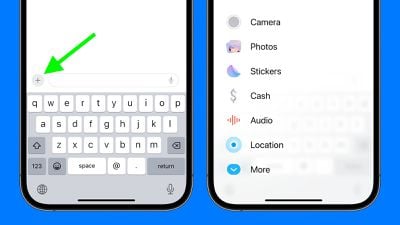
ios 17 messages apps
Now, all iMessage apps and tools like the camera and photo options can be accessed by tapping a "+" button above the keyboard and to the left of the text input field.

Tapping the "+" button brings up a menu column. From the top, the default order of options includes Camera, Photos, Stickers, Cash (where available), Audio, and Location. At the very bottom is a More button which when tapped reveals any other installed Messages apps (you can also swipe up to reveal this hidden list).

You can manually reorganize this list of iMessage apps, but you can't remove them directly from this screen. If you have no need for certain third-party apps in the list, you can delete them by following the steps below. Note that when you delete an iMessage app, it will also delete the associated app from your device's Home Screen.

  1. Open the Settings app.
  2. Scroll down and tap Messages.
  3. Tap iMessage Apps.
  4. Tap the red minus button next to an app, then tap the Delete button that appears.
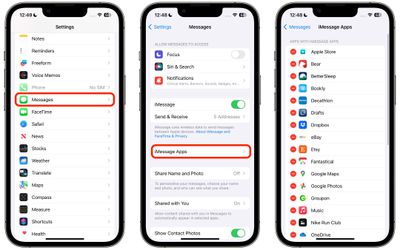
settings

Apple has added several new features to its Messages app in iOS 17 to make communicating with other Apple users more creative and fun. One of these new features is the ability to turn Live Photos into Live Stickers. Click the link to learn how it works.


Popular Stories

ios 27 messages

Apple Intelligence Introduces Contextual Call and Messages Features

Monday June 8, 2026 12:49 pm PDT by
Apple today announced a set of new communication-focused Apple Intelligence features, including contextual suggestions in Messages and a Call Context tool that surfaces relevant information from Mail when a user phones a business. The new Messages features offer one-tap suggestions based on the content of a conversation. If a contact asks for photos, Messages can surface a suggestion to...
ios 27 messages

14 Ways Apple Is Improving Messages in iOS 27

Wednesday June 10, 2026 4:01 am PDT by
Apple at this year's WWDC emphasized that its approach to iOS 27 development was to add fewer newer features and instead make existing features better. Examples of that approach can be seen across the operating system, but it is arguably most obvious in the changes coming to Messages. That's not to say there's nothing original coming to Messages in iOS 27. For instance, one new Apple...
iCloud iPhone 17 Pro

iPhone Users Who Pay for iCloud Storage Get Two New Perks on iOS 27

Thursday July 2, 2026 6:10 am PDT by
If you pay for certain iCloud+ storage plans beyond the 5GB that Apple offers for free, you will receive two more perks on iOS 27 at no additional cost. A summary of the two new iCloud+ perks on iOS 27:Increased daily usage limits for some new Apple Intelligence features, including image generation in the revamped Image Playground app. HomeKit Secure Video cameras receive generated video...













