How to Download the Fitness+ App on iPad - MacRumorsOpen MenuShow RoundupsShow Forums menuVisit ForumsOpen Sidebar
Skip to Content

How to Download the Fitness+ App on iPad

by

On the iPhone and the Apple TV, Fitness+ is installed automatically when upgrading to iOS 14.3 and tvOS 14.3, but that's not the case on the iPad.
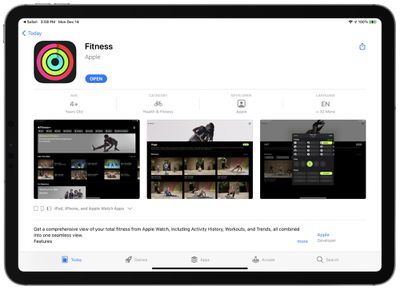
fitness plus on ipad
If you want to use Fitness+ on an iPad, you need to manually download the app from the App Store.

It's not clear why Apple didn't just add the Fitness+ app to the iPad when updating to iPadOS 14.3, but it's as simple as any other app to download. Just look it up in the App Store or click the link up above to access it, and then tap on "Get."

Once installed, the Fitness app on iPad can be used to view Fitness+ workouts, with or without an Apple Watch to track the workout. Unlike the Fitness app for iPhone, the Fitness app for iPad does not have a summary of fitness metrics nor does it list other fitness information -- the app is designed as a portal for Fitness+ and that's it.
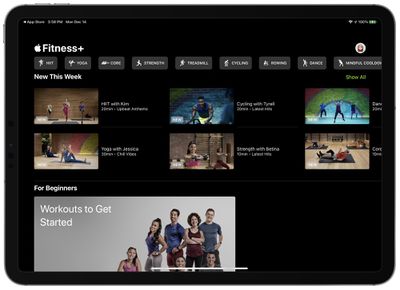
fitness plus on ipad 2
When Fitness+ was first released, the iPad app was nonfunctional and wasn't available to be downloaded, but Apple has now fixed that problem and everyone should be able to download it from the App Store.

Fitness+ is compatible with all iPad Pro models, the fifth-generation iPad and later, the iPad mini 4 and later, the third-generation iPad Air and later, and the 2014 iPad Air 2 and later. iPadOS 14.3 is required.

For more on Fitness+, make sure to check out our full Fitness+ guide.
Top Rated Comments

Rogifan Avatar
77 months ago
So the app is called Fitness, has the exact same logo as the iPhone app but only includes Fitness+. It doesn’t include the Summary tab like the iPhone app which includes all your workout information & activity rings. 🤦🏼‍♀️
Score: 8 Votes (Like | Disagree)
spencecb Avatar
77 months ago
This is so strange. I still can’t find the app when searching in the App Store. I can only when following the link in this article.


Score: 6 Votes (Like | Disagree)
Rogifan Avatar
77 months ago

Why in the world Apple can I not see my workouts from the fitness app on my iPad. There is so much data there that I would love to see on a nice big screen instead of threw a phone. Sometimes, for a multi billion dollar company known for its ecosystem, they make NO sense.
For some reason Apple thinks health info doesn’t belong anywhere but your iPhone. Stupid.
Score: 4 Votes (Like | Disagree)
BuffyzDead Avatar
77 months ago
iPad 5th Generation (2015 model). iOS 14.3
I see the app but it won't give me the download option, stating:

This app requires specific features not available on this device
Score: 4 Votes (Like | Disagree)
magicschoolbus Avatar
77 months ago
Why in the world Apple can I not see my workouts from the fitness app on my iPad. There is so much data there that I would love to see on a nice big screen instead of threw a phone. Sometimes, for a multi billion dollar company known for its ecosystem, they make NO sense.
Score: 3 Votes (Like | Disagree)
77 months ago
Already did three workouts. Obsessed.
Score: 3 Votes (Like | Disagree)

Popular Stories

apple fitness plus strength

Apple Fitness+ Gets Gym Strength Plans in iOS 27.3

Tuesday November 3, 2026 11:35 am PST by
With iOS 27.3, Apple is adding a new Gym Strength workout to Apple Fitness+. It's a custom fitness option that generates a four-week plan based on a user's goals, experience, schedule, and equipment. People of all experience levels can use the feature, selecting workout days, areas of the body to focus on, and session length. Workouts have recommendations for exercises, reps, sets, and...
iOS 28 AI

Apple Taking New Approach to Developing iOS 28 and macOS 28

Sunday November 8, 2026 7:42 am PST by
Apple has made a change to its development process for iOS 28, macOS 28, and corresponding software updates, according to Bloomberg's Mark Gurman. In his Power On newsletter today, he said Apple separates development of each year's new operating systems into three major stages. Typically, he said each stage consists of four weeks of coding followed by a four-week "convergence" period where...
duo aquarium

More Fun iPhone Duo Apps: 30 New Picks to Try

Friday November 6, 2026 3:27 pm PST by
When the iPhone Duo launched, we shared a list of some of the fun apps developers created for the new form factor. Two weeks out, developers are continuing to come up with fresh ideas, so we thought we'd share some of our favorites. Games Marbles Unhinged ($2.99) - Marbles Unhinged is a marble maze designed for the Duo. When you fold it, the floor turns into a ramp. If you stand the top...
Latest Stories
Apple Releases macOS Golden Gate 27.2.1
46 minutes ago
Apple Releases iOS 27.2.1 With Bug Fixes
50 minutes ago
Apple Releases watchOS 27.2.1 and visionOS 27.2.1 With Security Fixes
52 minutes ago
Apple Watch Ultra 4 Gets $99 Amazon Discounts, Starting at $699.99
1 hour ago
Apple Pay Ad Features Martial Arts Convenience Store Food Fight
1 hour ago
Apple Continues to Say Some AI Features Will Have Fees for Extra Usage
1 hour ago
Apple Announces Türkiye Expansion Plans as Tim Cook Visits
2 hours ago
Singapore Saved Apple $2.7 Billion in Taxes This Year
3 hours ago
Apple Music's 2026 Artist of the Year is Olivia Dean
3 hours ago
This Could Be Your Last Chance to Pre-Order the HomeView at a Discount
3 hours ago
Some HomePod Mini 2 Buyers Returning Units Over Mac Speaker Issues
3 hours ago
MacBook Pro With PROLED XDR Display: Details You Might Have Missed
4 hours ago
Satechi Offers MacRumors Readers 30% Off Select Accessories in Early Black Friday Sale
4 hours ago
Leaker Envisions a Shorter iPhone With a New iOS Layout
4 hours ago
Apple to Give You More Control Over When Your Mac Passwords Lock
5 hours ago
Siri Is Getting a Better Memory
6 hours ago
iPhone 18e Could Feature Bigger Display and Battery
6 hours ago
Apple's Siri Boss May Leave - Here's Who Could Take Over
6 hours ago
Apple Launching Two More New Products This Friday
7 hours ago
Apple Store Subscription Sign-Up Controversy Exposed
16 hours ago
Siri AI Rumored to Become 'More Like an Agent' as Early as Next Year
1 day ago
Apple Taking New Approach to Developing iOS 28 and macOS 28
1 day ago
Early Apple Black Friday Deals on Apple Watch, MacBook Air, and More
2 days ago
'Backglow' Lets You Customize New MacBook Pro's Glowing Apple Logo
2 days ago
Top Stories: Apple Product Launches, iOS 27.3 Beta, and More
2 days ago
More Fun iPhone Duo Apps: 30 New Picks to Try
3 days ago
Hands-On With Apple's New OLED Touchscreen MacBook Pro
3 days ago
Apple Store With All-New Design Opening Soon in Southern California
3 days ago
Control the Glowing Apple Logo on Your New MacBook Pro
3 days ago
Apple Shares New 'Apple Card: Apply and Use in Minutes' Ad
3 days ago









































