How to Change Siri and Audio Volume on HomePod - MacRumorsOpen MenuShow RoundupsShow Forums menuVisit ForumsOpen Sidebar
Skip to Content

How to Change Siri and Audio Volume on HomePod

by

The HomePod and the HomePod mini are designed to automatically adjust the volume of the Siri assistant based on the level of noise in the room, but you can also verbally adjust ‌Siri‌'s volume level separately from the volume level of the media that's playing.
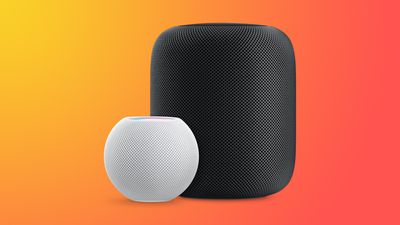
HomePodandMini feature orange
This how to walks you through the commands that you need to specifically adjust ‌Siri‌'s volume as needed.

How to Change Siri's Volume on HomePod

On ‌HomePod‌ or ‌HomePod mini‌, you can ask ‌Siri‌ to set the ‌Siri‌ volume to a specific percent, which is an adjustment that is separate from the media volume.

To do so, just say "Hey ‌Siri‌, change your volume to [percent]." You can also say "Hey ‌Siri‌, speak at [percent]."

If you tell ‌Siri‌ to set the ‌Siri‌ volume to 34 percent, for example, it will adjust it to that level while the music volume stays the same. ‌Siri‌ can be forced to be quieter or louder than your music.

Change the Media Volume on HomePod

You can also verbally adjust the media volume with a similar command, and this will adjust just the song volume without changing the ‌Siri‌ sound level.

To change the media volume, just say "Hey ‌Siri‌, change the media volume to [percent]."

Music levels can also be adjusted using the - and + buttons on the top of the ‌HomePod‌ or through a connected iPhone or iPad, but adjusting ‌Siri‌ volume specifically seems to require the spoken command.
Related Roundups: HomePod, HomePod mini

Top Rated Comments

70 months ago

Too bad Siri's volume won't stay set. Set the volume to a percentage and then ask a question. It jumps back up. You can verify by asking Siri what her speaking volume is.

Also, when did it become impossible to set or check the volume of other HomePods around the house? The only response I get now from Siri is "I can't volume information on multiple speakers".
This. It’s infuriating that there isn’t a maximum or persistent volume slider for Siri in each HomePod’s settings. Also, that it doesn’t allow you to set a nighttime speaking volume there.
Score: 12 Votes (Like | Disagree)
michaeldlord Avatar
70 months ago
Too bad Siri's volume won't stay set. Set the volume to a percentage and then ask a question. It jumps back up. You can verify by asking Siri what her speaking volume is.

Also, when did it become impossible to set or check the volume of other HomePods around the house? The only response I get now from Siri is "I can't check volume information on multiple speakers".
Score: 9 Votes (Like | Disagree)
PigsOnTheWing Avatar
70 months ago
This article needs to be deleted as Sir's volume level absolutely, positively does not stick beyond the initial request.
Score: 8 Votes (Like | Disagree)
70 months ago
While this feature would be seriously welcome, for some people in this thread [https://forums.macrumors.com/threads/14-4-brings-separate-siri-volume-control.2282052/]
including myself, the Siri volume reverts back to default volume the next time Siri speaks.
Score: 7 Votes (Like | Disagree)
Sanlitun Avatar
70 months ago
No this doesn't work.

You can ask Siri to set voice volume to 10% and then immediately ask her what time it is and she will revert to an automatic volume setting. Every time. Siri will not retain volume settings.

There is a huge thread on /r/Homepod Reddit ('https://www.reddit.com/r/HomePod/comments/lgtvcg/is_your_siri_too_loud_sometimes/') in regards to this, and in my case it's almost a dealbreaker with the HomePod.
Score: 5 Votes (Like | Disagree)
70 months ago
“Hey Siri, what is your speaking volume?”

“I’m at 61%”

“Hey Siri, change s speaking volume to 50%”

“Ok, I’ll dial it down”

“Hey Siri, what is your speaking volume?”

“I’m at 61%”
Score: 4 Votes (Like | Disagree)

Popular Stories

iOS 27 Ft

iOS 27: New Siri Features Could Be Gated Behind a Waitlist

Friday June 5, 2026 4:24 am PDT by
Bloomberg's Mark Gurman has published his WWDC preview ahead of Monday's keynote, and while almost all of the iOS 27 features he covers have already made the rounds, there are a couple of details worth highlighting. As we've covered previously, Apple is turning Siri into a full chatbot that users can interact with, similar to Claude or ChatGPT. The Siri chatbot will be integrated into...
WWDC26 MR Live Coverage Article

WWDC 2026 Apple Event Live Keynote Coverage: iOS 27, Revamped Siri, and More

Monday June 8, 2026 9:15 am PDT by
Apple's Worldwide Developers Conference (WWDC) starts today with the traditional keynote kicking things off at 10:00 a.m. Pacific Time. MacRumors is on hand for the event and we'll be sharing details and our thoughts throughout the day. We're expecting to see a number of software-related announcements today, headlined by a reset on Apple's push into AI that should see a significant overhaul...
Siri AI

Apple Announces 'Siri AI' at WWDC 2026

Monday June 8, 2026 10:52 am PDT by
Apple today announced a significantly revamped Siri at WWDC 2026, rebranding it as "Siri AI" and unveiling out a wave of new capabilities spanning conversational depth, system-wide integration, and a redesigned interface across platforms. Apple framed the update with the acknowledgment that "there are times when you expect more from Siri." The company is describing the redesigned assistant...