How to Set a Keyboard Shortcut to Activate Siri on Mac - MacRumorsOpen MenuShow RoundupsShow Forums menuVisit ForumsOpen Sidebar
Skip to Content

How to Set a Keyboard Shortcut to Activate Siri on Mac

by

Since macOS Sierra, Apple has included Siri on the Mac, enabling desktop users to ask the virtual assistant general queries and give it spoken commands.

macbook pro hey siri
‌Siri‌ for Mac can do most of the same things ‌Siri‌ can do on iOS. It can give you sports scores, tell you about the weather, schedule an event in your calendar, remind you what you need to get done today or even find movie times. It can also help you with common desktop tasks, like searching for images or changing your Mac's display settings.

‌Siri‌ on Mac can be invoked by clicking the ‌Siri‌ icon in the menu bar at the top of the screen. If it's easier, you can also use a keyboard shortcut so that your fingers don't need to leave the keys. You can customize the keyboard shortcut assigned to ‌Siri‌ in the following way.

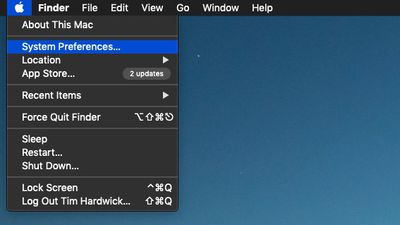
  1. Click the Apple () symbol in the menu bar at the top-left corner of the screen and select System Preferences....
    apple menu system preferences

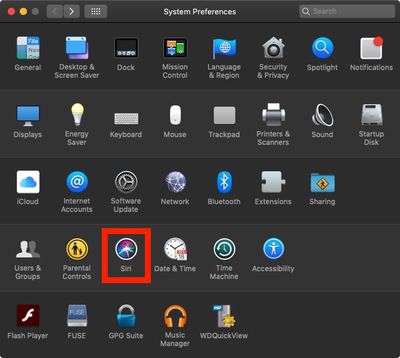
  2. Click the Siri icon in the preferences panel.
    siri system preferences

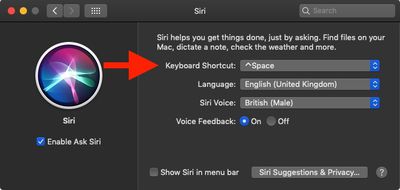
  3. Click the Keyboard Shortcut dropdown menu. The default options are Hold Command Space, Hold Option Space, and Press (fn) Function Space. You can also define your own custom shortcut by clicking Customize... and then pressing the keys you wish to use.
    siri preference pane keyboard shortcut

Be sure to check out the other options for ‌Siri‌ in the System Preferences pane, including language, voice, voice feedback, and mic input. For more information on how to use ‌Siri‌ in macOS, click here.

Popular Stories

iphone 16 teal

Siri Lawsuit: Apple Agrees to Pay Owners of These iPhone Models

Thursday May 7, 2026 6:30 am PDT by
Apple has agreed to pay $250 million to settle a U.S. class action lawsuit over delayed Siri features, and eligible iPhone users could receive up to a $95 payout. Below, we have answered some key questions regarding the lawsuit. Why Was Apple Sued? In June 2024, Apple previewed new Siri capabilities powered by Apple Intelligence, including understanding of a user's personal context,...
Finder Siri Feature

iOS 27 Getting Major Siri Redesign With Chat Interface and Dedicated App

Tuesday May 12, 2026 1:38 pm PDT by
Apple is introducing an overhauled version of Siri in iOS 27, evolving the personal assistant into a more capable chatbot and AI agent able to compete with ChatGPT, Claude, and Gemini. With Siri's transition, Apple will be making multiple Siri-related design changes in iOS 27, according to a new report from Bloomberg. Siri will largely live in the Dynamic Island in iOS 27, but there will also be...
OpenAI vs Apple Feature

OpenAI Considering Legal Action Against Apple Over 'Strained' Siri Partnership

Thursday May 14, 2026 10:52 am PDT by
OpenAI is preparing to potentially take legal action against Apple due to a "strained" relationship with the iPhone maker, according to Bloomberg's Mark Gurman. The two companies reached a partnership in 2024 that saw ChatGPT integrated into features like Siri and Image Playground across iOS, iPadOS, and macOS. iPhone users can also subscribe to ChatGPT directly via the Settings app, with...