Make HomePod Alert You to Smoke Alarms - MacRumorsOpen MenuShow RoundupsShow Forums menuVisit ForumsOpen Sidebar
Skip to Content

Make HomePod Alert You to Smoke Alarms

by

Thanks to Apple's Sound Recognition feature, the HomePod mini and second-generation HomePod can send you notifications when they recognize smoke or carbon monoxide alarm sounds. Keep reading to learn how it works.
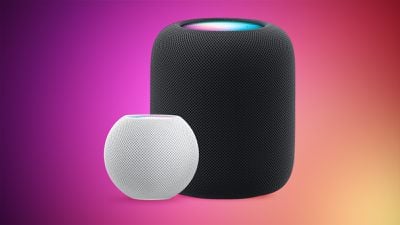
HomePod 2 and Mini feature 1
With Sound Recognition, HomePod can detect the sound of a smoke or carbon monoxide alarm in your home, and alert you by sending a notification to your iPhone, iPad or Apple Watch.

It's a neat addition if you don't own a smart detector, although Apple warns that the feature should not be relied upon "in circumstances where users may be harmed or injured," or in "high-risk or emergency situations."

The Sound Recognition feature is accessible in the Home app. If your Home system is connected to a smart camera, it will also display live video of your home, so you can see what's happening in real time.

Here's how to enable the feature. Note that Sound Recognition on HomePods requires Apple's updated Home app architecture that was introduced in 2022 as part of iOS 16.4 and iPadOS 16.4.

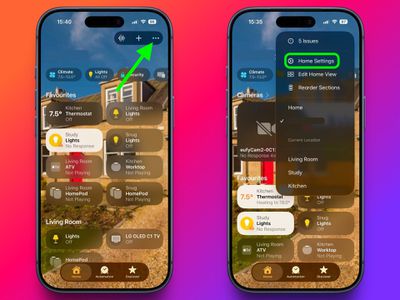
  1. In the Home app, tap the ellipsis button (three dots) in the top-right corner of the screen.
  2. Tap Home Settings.
    home

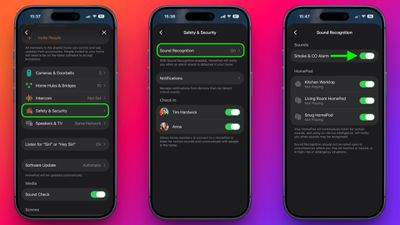
  3. Tap Safety & Security ➝ Sound Recognition.
  4. Under "Sounds," make sure the Smoke & CO Alarm toggle is in the green ON position.
  5. Toggle on the switches next to the HomePod devices that you want to enable Sound Recognition for.
    home

That's all there is to it. Note that you can also access the Sound Recognition menu via the Home app's menu cards for individual HomePods.

Sound Recognition was first introduced on the iPhone in 2020 and can detect a wide variety of sounds on that device, including a doorbell, running water, a baby crying, a car horn, a door knock, a cat meowing or dog barking, and more.


Top Rated Comments

TFrank2 Avatar
8 months ago

FWIW, for the people that are saying they tested it and it hasn't worked, I think the alarm has to be sounding for a bit (30 seconds.... a minute??) before it will alert you. I don't think just hitting the "test" button on a smoke alarm will trigger it.

Yes, it detected the alarm going off on my UPS a few months ago.

How long are you running the alarm for? In my testing, the alarm needs to be going for at least 30 seconds before my HomePod mini alerts me.
Finally got it to work. Turned it off/on, ran a test on YouTube and at about 45 seconds it shot me an alert. Success!
Score: 3 Votes (Like | Disagree)
8 months ago
Will it alert us when the new HomePod mini 2 is released?
Score: 3 Votes (Like | Disagree)
8 months ago

I’ve had this enabled for ages and tried to test it a few times to no avail. Anyone here have any luck with it?
Yes, my family was out of town for a weekend about a month ago and we had this alert come in. I was able to check our HomeKit camera to verify the alarm was going off, so we called the fire department. They came to our house and inspected things. They were able to verify it was a false alarm because of some dust in an old alarm that I've now replaced. I was glad it ended up being a false alarm, but it made me thankful for the feature in the event of a real emergency.
Score: 3 Votes (Like | Disagree)
TFrank2 Avatar
8 months ago
I’ve had this enabled for ages and tried to test it a few times to no avail. Anyone here have any luck with it?
Score: 3 Votes (Like | Disagree)
8 months ago

I’ve had this enabled for ages and tried to test it a few times to no avail. Anyone here have any luck with it?
It literally kept my house from burning down (with my dog inside!!!!) last year. We got an alert and were able to call 911 and a friend to come over and get our pup
Score: 2 Votes (Like | Disagree)
8 months ago

My smoke alarms are so loud, I don't really need any addl notification ;)
Well, if you’re not home, you might change your mind
Score: 2 Votes (Like | Disagree)

Popular Stories

iOS 27 Next to iPhone

Here's When iOS 27 Rolls Out Today in Every Time Zone [Update: It's Out]

Sunday September 13, 2026 3:00 am PDT by
Update 10:04 a.m.: iOS 27 is rolling out now, though it may take a bit for all users to see it, so keep checking! Apple is about to release iOS 27, which will finally deliver more advanced Siri AI capabilities as well as a variety of other refinements, improvements, and new features to iPhones. It's Apple's biggest software update of the year, and Apple announced at Wednesday's iPhone event...
iOS 27 Icon iPhone

iOS 27 Available Now With These 8 New Features

Monday September 14, 2026 9:00 am PDT by
Update — 10 a.m. Pacific Time: Apple has released iOS 27. During its iPhone 18 Pro and iPhone Duo event last week, Apple announced that iOS 27 will be released widely on Monday, September 14. iOS 27 should be available around 10 a.m. Pacific Time / 1 p.m. Eastern Time today via the Settings app, under General → Software Update. Below, we have highlighted eight new features and...
Apple iCloud Plus expansion hero

iCloud+ Now Includes Apple TV, Apple Arcade, and Curated Apple Music Stations in Over 100 Countries

Tuesday September 15, 2026 1:43 am PDT by
Apple today announced a new subscription initiative that turns paid iCloud+ subscriptions into a broader services bundle in more than 100 countries. In select countries, Apple says every paid iCloud+ plan, including the cheapest 50GB tier, now includes Apple TV and Apple Arcade "at no additional cost," while family sharing extends the storage, TV and Arcade access to up to five people....