

iOS 17: How to Record a FaceTime Video or Audio Message - MacRumorsOpen MenuShow RoundupsShow Forums menuVisit ForumsOpen Sidebar
Skip to Content

iOS 17: How to Record a FaceTime Video or Audio Message

by

In iOS 17, when you ‌FaceTime‌ someone and they aren't able to answer, you can leave a video or audio message depending on the call method you used. If you are using ‌‌FaceTime‌‌ video, you can leave a video message, and if you are using ‌‌FaceTime‌‌ audio, you can leave an audio message.

facetime video messages ios 17
All you have to do is ‌FaceTime‌ someone in the usual way. After a missed call, you'll see a "Record Video" option, which will allow you to create a message. After you've recorded one, you'll see a preview of your video, and the option to re-record if it didn't turn out well.

Here's how leaving a ‌FaceTime‌ message works on devices running iOS 17, using a missed video call as an example,

  1. In ‌FaceTime‌, choose someone from your contacts to video call.
  2. If they don't answer, tap Record Video.
  3. Next, tap the Record button to record your message, then tap the Stop button when you're finished.
  4. Tap Play to view the recorded message. If you're happy with it, tap the Send button, otherwise tap Cancel.
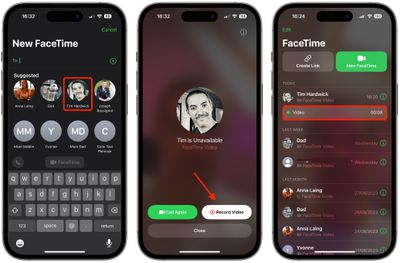
FaceTime

Once sent, the video message is in the ‌‌FaceTime‌‌ missed call log, where the person can watch the video and call you back.

Note that there is an option for people to save video messages to their Camera Roll, so keep that in mind when sending a video to someone.


Popular Stories

iOS 27 and FaceTime Feature

iOS 27 Improves FaceTime in Three Ways, Including Dual Capture

Thursday June 11, 2026 6:27 am PDT by
iOS 27 includes three enhancements for FaceTime, with the most notable one being a dual camera feature on some newer iPhone models. On the iPhone 17, iPhone 17 Pro, iPhone 17 Pro Max, and iPhone Air, a Dual Capture feature allows you to record video of yourself and what is in front of you at the same time. Starting with iOS 27, this feature is now supported in the FaceTime app on these...
iCloud iPhone 17 Pro

iPhone Users Who Pay for iCloud Storage Get Two New Perks on iOS 27

Thursday July 2, 2026 6:10 am PDT by
If you pay for certain iCloud+ storage plans beyond the 5GB that Apple offers for free, you will receive two more perks on iOS 27 at no additional cost. A summary of the two new iCloud+ perks on iOS 27:Increased daily usage limits for some new Apple Intelligence features, including image generation in the revamped Image Playground app. HomeKit Secure Video cameras receive generated video...
iPhone 4 on Black Feature

Apple Facing One of Its Worst Leaks Since the iPhone 4

Thursday July 2, 2026 9:53 am PDT by
Apple supplier Tata Electronics recently suffered a cyberattack that resulted in thousands of confidential files being published on the dark web, and this reportedly included some photos and documents related to the upcoming iPhone 18 Pro. We have elected not to share any of the leaked photos in this story due to the illegal nature in which they were obtained, but they can easily be found...













