iOS 15.1: How to Share Your Screen on a FaceTime Call - MacRumorsOpen MenuShow RoundupsShow Forums menuVisit ForumsOpen Sidebar
Skip to Content

iOS 15.1: How to Share Your Screen on a FaceTime Call

by

In iOS 15.1, Apple has brought several enhancements to FaceTime, which means you can do more than just ‌‌FaceTime‌‌ call your friends and family.


Thanks to a new screen sharing feature called SharePlay, you can now share your screen with other people on a call, which is great for choosing a movie, browsing through a photo album, or anything else that's enhanced by group discussion.

Here's how the new screen sharing feature works:

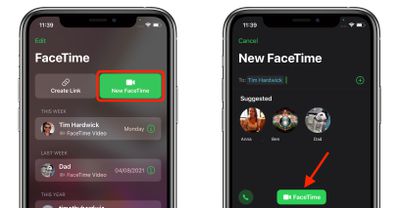
  1. Launch FaceTime on your iPhone or iPad.
  2. Tap New FaceTime and add the contacts that you want to share your screen with, then tap the FaceTime button. Alternately, select a recent contact to initiate a video call.
    FaceTime

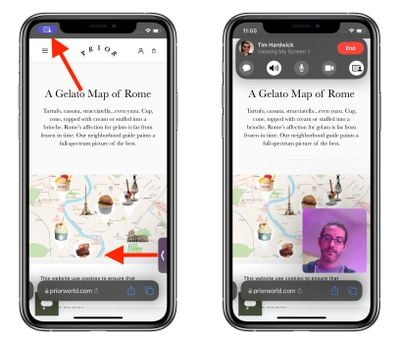
  3. When the call has connected, tap the SharePlay button at the top-right corner of the screen in the new control panel.
  4. Tap Share My Screen in the dropdown. After a three-second countdown, screen sharing should initialize.
    FaceTime

Once ‌FaceTime‌ screen sharing has started, you can navigate to any app that you want to share with the callers. A sharing icon will remain in the top-left corner of the screen to indicate that ‌FaceTime‌ screen sharing is active, and you can tap it to reveal the ‌FaceTime‌ control panel.

FaceTime
You can swipe away the active caller's face for more screen space, and swipe them back into view just as easily. If you're viewing someone else's shared screen, you'll see their name just below the top-left icon, alongside buttons to send them a message, Love what they're sharing, or share it with someone else.

If you like, you can also listen to music or watch movies and TV together using the SharePlay interface. You can stream movies or TV shows and everyone on the call will see the same synced playback and controls. For more on what's new with ‌FaceTime‌ in iOS 15, we have a dedicated guide that highlights all of the available features.

Related Forum: iOS 15

Top Rated Comments

b11051973 Avatar
62 months ago
I look forward to this. Will be very helpful since I'm tech support for family members that are hundreds of miles away.
Score: 23 Votes (Like | Disagree)
62 months ago
cutting mom-tech-support from 4 hours to 10 minutes.
Score: 14 Votes (Like | Disagree)
TheYayAreaLiving 🎗️ Avatar
62 months ago
It looks pretty neat. This one is definitely going to be very useful.
Score: 4 Votes (Like | Disagree)
62 months ago
This will be very useful when having to help family members.
Score: 3 Votes (Like | Disagree)
62 months ago
This is going to be such a useful feature.
Score: 3 Votes (Like | Disagree)
62 months ago

So if I'm sharing, for example, my Netflix app, can they tap on a movie to watch, or do they have to ask me to tap for them?

In other words, are they able to just view my screen, or can they interact with it themselves?
They can view your screen only not interact
Score: 2 Votes (Like | Disagree)

Popular Stories

Apple WWDC25 iOS 26 CarPlay Light mode 250609

Six Popular iPhone Apps Now Available on CarPlay

Thursday May 14, 2026 9:10 am PDT by
Apple's CarPlay system for accessing iPhone apps on a vehicle's dashboard screen has received six popular apps in recent weeks: ChatGPT, Perplexity, Grok, Google Meet, WhatsApp, and the indie artist streaming platform Audiomack. Make sure you have the latest version of each app and they will automatically appear on CarPlay. ChatGPT Starting with iOS 26.4, CarPlay supports voice-based...
ipad mini 7 blue

OLED iPad Mini: Release Date, Pricing, and What to Expect

Thursday May 14, 2026 5:08 am PDT by
According to the latest rumors, Apple is close to launching its next-generation iPad mini. So what should we expect from the successor to the iPad mini 7 that Apple released over a year ago? Read on to find out. Processor and Performance Apple is working on a next-generation version of the iPad mini (codename J510/J511) that features the A19 Pro chip, according to information found in code...
Dynamic Island iPhone 18 Pro Feature

11 Reasons to Wait for the iPhone 18 Pro

Monday May 11, 2026 9:01 am PDT by
We're only four months out from the launch of Apple's premium next-generation smartphone lineup, and while we're not expecting a sea change in terms of functionality, there are still several enhancements rumored to be coming to the iPhone 18 Pro and iPhone 18 Pro Max. One thing worth noting is that Apple is reportedly planning a major change to its iPhone release cycle this year, adopting a...