Tips for Getting Siri to Play Tracks in Apple Music - MacRumorsOpen MenuShow RoundupsShow Forums menuVisit ForumsOpen Sidebar
Skip to Content

Tips for Getting Siri to Play Tracks in Apple Music

by

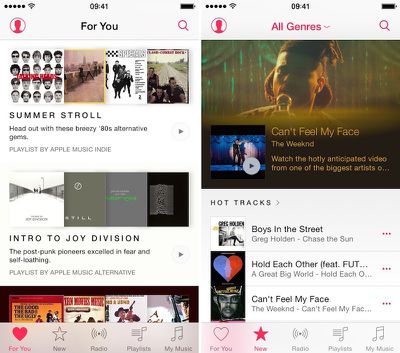
If you are signed up for the free, three-month trial of Apple Music, you probably know by now many of the cool features the streaming music service has to offer. But, did you know that Siri can make the experience even better? We've got a few tips for getting Siri to act as your digital deejay.
Apple Music
To get the full use of Siri's compatibility with Apple Music, make sure you are subscribed and your iCloud Music Library is on.

Play a Radio Station or Beats 1

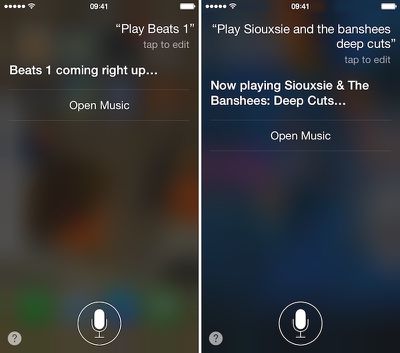
Not only can Siri play a radio station like Electronic or Oldies, but now the personal assistant can also start playing live Beats 1 programming. Just ask her to "Play Beats 1."
Apple Music and Siri 1

Play an Apple Music Playlist

One of the things I love about Apple Music is the playlist feature in the For You section. If I've recently "liked" a particular song, A new playlist based on that will show up. If you know the name of an Apple Music created playlist, ask for it specifically. For example, "Play Souxie & The Banshees: Deep Cuts."

What Song is Playing

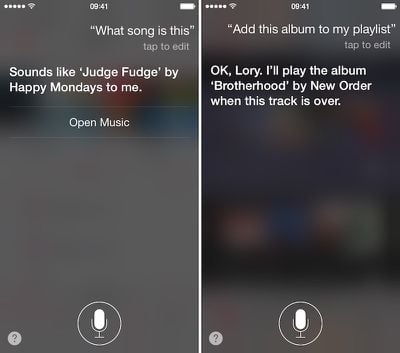
If Apple Music is playing a song you don't recognize, you can ask for more information. Just say, "What song is this?" to discover the artist and song title.
Apple Music and Siri 2

Add an Album to Your Playlist

If you like the song that is playing and want to hear the whole album, ask Siri to add the album to your playlist and it will begin playing after the current track is finished.

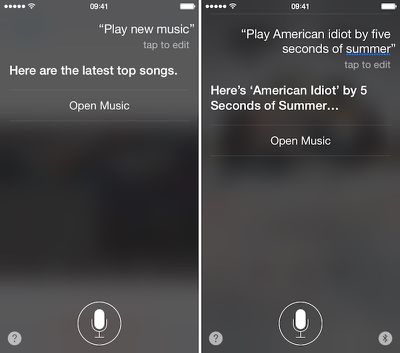
Play New Music

Sometimes, you just don't know what you want to hear. Ask Siri to "play new music" and Apple's latest top songs will begin playing. Sometimes, that is the best way to discover your new favorite band.
Apple Music and Siri 3

Cover Songs

When asking Siri to play a specific song, there may be a number of different versions. She will choose the original first. However, if you want to hear the version covered by a different band, be sure to include that in your request.

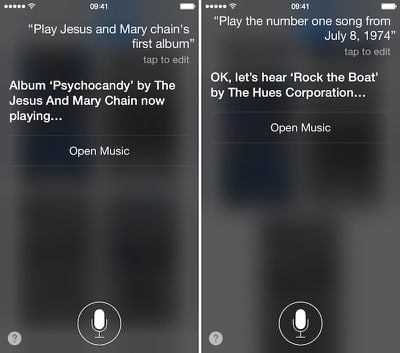
Play a Band's Album Based on Chronology

If you know that you like an artist's first, but can't remember what it is called, you can get help from Siri. Just ask to play an artist's first, second, or even most recent album. She will figure it out for you.
Apple Music and Siri 4

Play the Hits From a Specific Date

Have you ever wondered what song was number one the day you were born? Ask Siri. If the song is in Apple Music, you can hear it, too. You can also play the top 10, 25, or 50 songs from a certain month or year.

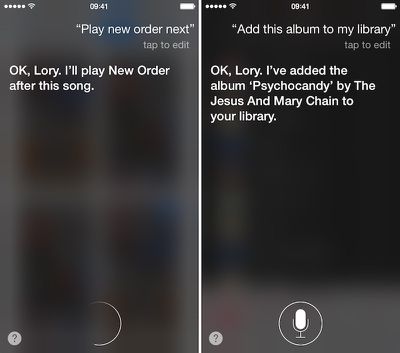
Playlist Queuing

While listening to a specific song, does it sometimes make you want to listen to another one? Ask Siri to play something after the current song is over and it will be queued to your Up Next list.
Apple Music and Siri 5

Add Music to Your Library (only available with iCloud Music Library on)

Another great feature of Apple Music is that you can add songs and albums to your music library, and even download them for offline listening. Just ask Siri to add a song, album, or even playlist to your music and it will be there waiting for you.

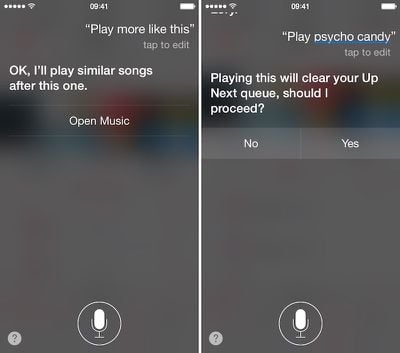
Play More Songs Like This

When you are browsing music and finally find a song that hits you just right, you can ask Siri to play more like it and Apple Music will create a Genius playlist based on your request.
Apple Music and Siri 6

Play a Different Song or Album

You don't have to wait for a song to end in order to get into a new groove. When you ask Siri to play a new album, she will let you know that it will clear your Up Next queue. Confirm that you are into something different now to hear the new tracks.

Like a Song

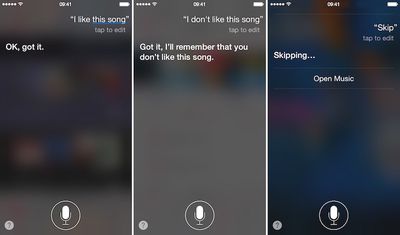
One way to ensure that Apple Music will provide useful suggestions for songs that you might like in the future is to like a song. This gets added to your activity and is used to create new playlists you might like. So, tell Siri when you like a song.
Apple Music and Siri 7

Dislike a Song

Of course, it works both ways. If you don't like a song, tell Siri and it will be added to your activity. Plus, you'll have the added benefit of not having to hear it anymore. Apple Music will play the next song instead.

Skip a Song

If you don't want to hear a particular song, but don't want it to go into the Pit of Dislike, just ask Siri to skip it and the next song will play instead.
Top Rated Comments

darcyf Avatar
147 months ago
Any use of Siri while a song is actually playing interrupts the playback. What's the good of that?
Score: 2 Votes (Like | Disagree)
nortofthe13th Avatar
147 months ago
This is where it gets awesome! The Siri integration is wicked!
(I know some people have had a rough experience with Music, and Siri for that matter... But I'm hooked!)
Score: 2 Votes (Like | Disagree)
michaelant Avatar
147 months ago
Any use of Siri while a song is actually playing interrupts the playback. What's the good of that?
If you use Siri on the Apple Watch, it doesn't interrupt playback at all, and is pretty frickin awesome. You don't even have to touch a button! Just look at your wrist, say "hey Siri, play some Daft Punk" and away it goes.

You can't add tracks to Up Next yet on the Watch, but that'll be there in a month or two with the next OS version, if I remember correctly. Controlling music by talking to my watch is my favorite thing about the Apple Watch so far.
Score: 1 Votes (Like | Disagree)
147 months ago
There was definitely some good tips in here.

My current biggest annoyance is that when I add a playlist to my music, and I already have some of those songs, I end up with doubles inside of those albums.

Anyone having a similar issue or have a remedy?
Score: 1 Votes (Like | Disagree)
Analog Kid Avatar
147 months ago
I don't want to subscribe to Apple Music, but I would still like Siri to play a song from my library when asked. Any hints?

All I get now is an error message...

Score: 1 Votes (Like | Disagree)

Popular Stories

Apple Music iPod Page Not Found

Apple Music Has a Hidden iPod You Can Play With

Friday October 23, 2026 7:11 am PDT by
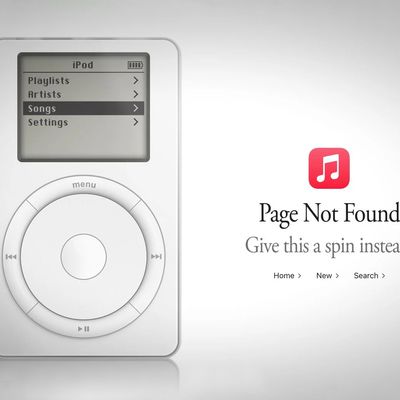
Apple Music has a 404 page easter egg on the web: a functional iPod that appears when you load a page that does not exist, such as music.apple.com/macrumors. "Page Not Found," says Apple. "Give this a spin instead." Apple is clever with this. If you navigate to music.apple.com/ipod instead, the page says "Looking for something?" instead of "Page Not Found." The easter egg is only...
Apple TV 4K 4th Generation Top View5

New Apple TV 4K Announced With A19 Chip, Updated Siri Remote, More

Tuesday October 13, 2026 6:08 am PDT by
Apple today announced the fourth-generation Apple TV 4K, with key features including an A19 chip, Siri AI support, an updated Siri Remote that has Find My support with Precision Finding, built in far-field microphones, support for surround sound with four HomePods in front and rear pairs, and more. The A19 chip in the new Apple TV 4K delivers up to 50% faster CPU performance and up to twice...
Apple Music New Branding

Apple Music's New Look Officially Announced

Wednesday October 21, 2026 9:06 am PDT by
Following the introduction of a new Apple Music logo and app icon earlier this month, Apple today officially introduced Apple Music's new brand identity. In a YouTube video shared today, Apple said the new Apple Music visuals were "made by sound." More specifically, Apple said it played a sound through a container of water, resulting in the liquid moving at the frequency of the notes. Apple...
Latest Stories
Siri AI Rumored to Become 'More Like an Agent' as Early as Next Year
1 hour ago
Apple Taking New Approach to Developing iOS 28 and macOS 28
3 hours ago
Early Apple Black Friday Deals on Apple Watch, MacBook Air, and More
22 hours ago
'Backglow' Lets You Customize New MacBook Pro's Glowing Apple Logo
22 hours ago
Top Stories: Apple Product Launches, iOS 27.3 Beta, and More
1 day ago
More Fun iPhone Duo Apps: 30 New Picks to Try
2 days ago
Hands-On With Apple's New OLED Touchscreen MacBook Pro
2 days ago
Apple Store With All-New Design Opening Soon in Southern California
2 days ago
Control the Glowing Apple Logo on Your New MacBook Pro
2 days ago
Apple Shares New 'Apple Card: Apply and Use in Minutes' Ad
2 days ago
Apple Says More Than 100,000 Apps Optimized for iPhone Duo, Here's What's Still Missing
2 days ago
Early Black Friday Deals Kickoff With Steep Discounts on Apple Watch Ultras and More
2 days ago
The MacRumors Show: iOS 27.3 Looks Like a Huge Update
2 days ago
Best Buy's Black Friday Event Begins With Sitewide Savings on Apple, TVs, More
2 days ago
Apple Releasing Yet Another Two New Products Next Week
2 days ago
MacBook Air Drops to Lowest Price in Months With Amazon's $250 Discount
2 days ago
Apple Rumored to Drop the iPhone's Action Button Next Year
2 days ago
Apple's Extended Return Policy Now in Effect for 2026 Holiday Season
2 days ago
Apple Music Classical Updated With New Icon and Refreshed Design
2 days ago
OLED iPad Mini, M6 iMac, and New MacBook Pros Available From Today
2 days ago
Apple Surveys iPhone Duo Buyers About Crease and Camera
3 days ago
Apple's First Touchscreen Mac is Now Arriving to Customers
3 days ago
Claude Gets Personal Finance Feature With Bank Account Linking
3 days ago
Apple Arcade Adds Crossy Road Rush and NBA 2K27
3 days ago
Apple's New HomeView Smart Home Hub: Here's How Much RAM It Has
3 days ago
iPad Mini vs. iPad Air Buyer's Guide: Now Just $50 Apart
3 days ago
First iOS 27.3 and macOS Golden Gate 27.3 Public Betas Now Available
3 days ago
Apple Announces a New Mac Sales Record
3 days ago
Paid $200 for Logic Pro? Apple Says You Won't Get This New Feature
3 days ago
Instagram's Edits Video Editor is Now Available on Mac
3 days ago