

iOS 16: How to Use the 'Follow Up' Feature in Apple Mail - MacRumorsOpen MenuShow RoundupsShow Forums menuVisit ForumsOpen Sidebar
Skip to Content

iOS 16: How to Use the 'Follow Up' Feature in Apple Mail

by

Apple's stock Mail app has received some notable improvements in iOS 16 and iPadOS 16, with new features added that rival mail apps have offered for some time. One of these new features is called "Follow Up," which is designed to move sent email messages to the top of your inbox so you can send a follow-up if you don't hear back from the person you sent the email to.

iOS 16 Mail Guide Feature
This handy feature is very simple to use, and it can help you to remember to return to certain emails that you otherwise might have forgotten about.

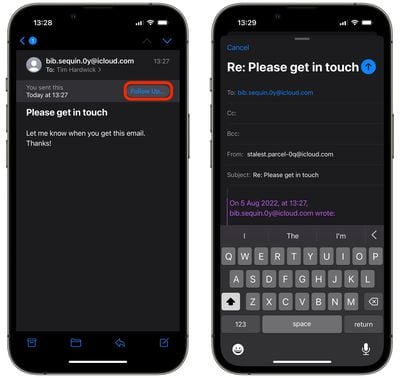
On certain emails in your inbox where you've indicated that you're awaiting a response, you'll see a "Follow Up" option. Tapping it will take you to the compose interface with an email addressed to the person that you're waiting to hear from.
mail
Similar to Gmail, Apple Mail achieves its intelligent Follow Up feature using an algorithm that checks for emails you sent that include a question, but which you've not heard an answer back from.

Other new Mail features worth learning about in iOS 16 and iPadOS 16 include the ability to schedule emails and a handy way to unsend emails that you just sent out.


Popular Stories

General macOS Mail Feature

Apple Hide My Email Vulnerability Exposes Real Email Addresses

Wednesday July 1, 2026 6:20 am PDT by
A flaw in Apple's Hide My Email service can reportedly allow almost anyone to uncover the real email address behind a generated alias, and Apple has failed to address it for more than a year since it was first reported. 404 Media is withholding the technical specifics of the vulnerability because it remains exploitable, but the publication verified the issue this week using one of its own...
iCloud iPhone 17 Pro

iPhone Users Who Pay for iCloud Storage Get Two New Perks on iOS 27

Thursday July 2, 2026 6:10 am PDT by
If you pay for certain iCloud+ storage plans beyond the 5GB that Apple offers for free, you will receive two more perks on iOS 27 at no additional cost. A summary of the two new iCloud+ perks on iOS 27:Increased daily usage limits for some new Apple Intelligence features, including image generation in the revamped Image Playground app. HomeKit Secure Video cameras receive generated video...
iPhone 4 on Black Feature

Apple Facing One of Its Worst Leaks Since the iPhone 4

Thursday July 2, 2026 9:53 am PDT by
Apple supplier Tata Electronics recently suffered a cyberattack that resulted in thousands of confidential files being published on the dark web, and this reportedly included some photos and documents related to the upcoming iPhone 18 Pro. We have elected not to share any of the leaked photos in this story due to the illegal nature in which they were obtained, but they can easily be found...













