

iOS 26: How to Use the New Music Pins Feature - MacRumorsOpen MenuShow RoundupsShow Forums menuVisit ForumsOpen Sidebar
Skip to Content

iOS 26: How to Use the New Music Pins Feature

by

If you've ever found yourself scrolling endlessly through your iPhone's music library to find that one album you play every morning or the workout playlist that gets you pumped, then you should find iOS 26's new Music pins feature a welcome addition to the app.

pin apple music app ios
Basically, Apple Music lets you pin your most frequently accessed songs, playlists, albums, and artists directly to the top of your Library tab, making them readily accessible with a single tap.

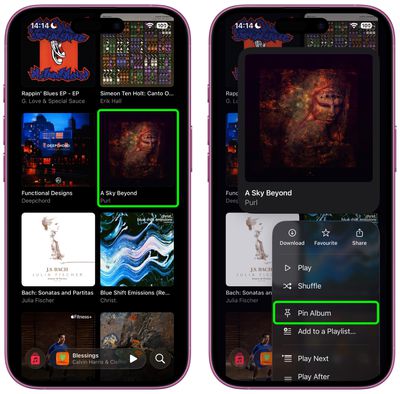
Pinning keeps your musical essentials within easy reach, and it couldn't be easier to use. In the Music app, simply navigate to the song, album, artist, or playlist that you want to pin, then long press on the item and choose the Pin option from the popup menu.
music
To unpin an item from the top of your Library tab, it's pretty much the same action – long press it and choose the Unpin option from the popup menu.

Download Pinned Items?

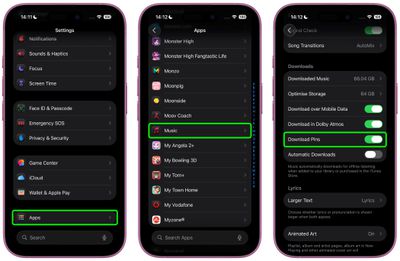
The first time you use Music pins, iOS 26 will ask if you want to download pinned items automatically for offline listening. You can adjust this setting anytime by navigating to Settings ➝ Apps ➝ Music and toggling Download Pins.
settings
Music pins aren't the only new Music addition in iOS 26. The app now has an AutoMix feature to create seamless DJ-style transitions between songs, plus there's also lyrics translation and lyrics pronunciation, making it easier to appreciate music from all over the world. Note that iOS 26 is currently in beta and will be released in the fall.


Top Rated Comments

13 months ago
Neat.

Now let me add songs to Music from the Files app.
Score: 11 Votes (Like | Disagree)
13 months ago
Nice. I hope it appears in CarPlay as well. I can generally find a moment to root through my phone generally for stuff to listen to, but in the car I need very quick access to key playlists/etc.
Score: 11 Votes (Like | Disagree)
RUQRU Avatar
13 months ago
I would be nice if it allowed Radio Stations to be pinned also.
Score: 5 Votes (Like | Disagree)
bradriley Avatar
13 months ago

I would be nice if it allowed Radio Stations to be pinned also.
It’s baffling you can’t even pin the Apple’s own Apple Music stations. Do Apple employees even use their own platforms???
Score: 4 Votes (Like | Disagree)
jamie j. Avatar
13 months ago
Sadly this is useless to me because it requires you to turn on library sync. The last time I did this, it deleted all of the high quality recordings I had out of my iTunes. Had to turn it off and then do a restore from a backup. I refuse to turn on library sync. Also, why do I have to? I just want the pinned playlists on my iPhone. It doesn't need to sync with anything else.

If anyone has a workaround for this, I'd love to hear it.
Score: 4 Votes (Like | Disagree)
13 months ago
The post should mention that you can control what happens when you tap a pinned item as well in the app and in the widget. You long press the icon in the Pinned section and select Tap Action where you can pick to play, shuffle or go to the playlist.

Attachment Image
Score: 3 Votes (Like | Disagree)

Popular Stories

apple music

Apple Music Now Costs $11.99 as Apple Increases Subscription Prices

Friday July 17, 2026 11:25 am PDT by
Apple today increased the price of Apple Music and some Apple One subscription bundles. An individual Apple Music subscription is now $1 more expensive in the United States, going from $10.99 to $11.99 per month. Pricing on the Apple Music Family plan increased by $3, increasing from $16.99 to $19.99. Student pricing is up $1, with the plan now priced at $6.99. The price of the individual ...
iPhone 18 Pro Deep Red Feature

iPhone 18 Pro Launching in Two Months With These 12 New Features

Friday July 17, 2026 10:39 am PDT by
It is now mid-July, and that means the iPhone 18 Pro and iPhone 18 Pro Max are now just two months away. The devices are expected to look similar to the iPhone 17 Pro and iPhone 17 Pro Max, but there will still be many year-over-year changes, with rumored features including a smaller Dynamic Island, 5G via satellite, and more. Apple is expected to unveil the iPhone 18 Pro, iPhone 18 Pro Max, ...
Apple AppleCare One Feature

'AppleCare One' is Now Even More Valuable

Saturday July 18, 2026 6:25 am PDT by
While the monthly and annual prices of AppleCare+ plans for Macs and iPads received a slight increase this week, AppleCare One continues to start at $19.99 per month in the U.S., making the multi-device plan even more valuable. Launched in July 2025, AppleCare One allows you to cover up to three devices as part of a single subscription for $19.99 per month, and additional devices can be...















