How to Wake Up to a Weather Forecast on Your iPhone's Lock Screen - MacRumorsOpen MenuShow RoundupsShow Forums menuVisit ForumsOpen Sidebar
Skip to Content

How to Wake Up to a Weather Forecast on Your iPhone's Lock Screen

by

In iOS 12, Apple has included a somewhat hidden feature that lets you see the day's weather forecast on your iPhone's Lock Screen when you check it for the first time after waking up.
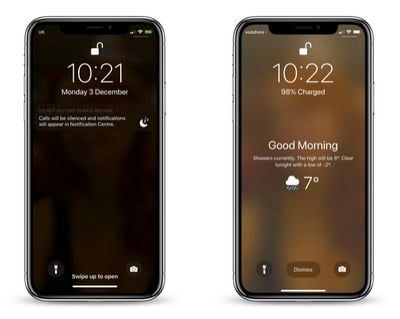
how to wake up to a weather forecast on your iphone lock screen
The feature is part of Apple's Do Not Disturb at Bedtime mode, which prevents notifications from being displayed on your iPhone's Lock Screen when you're supposed to be sleeping.

Many users don't realize you can get the weather forecast to show on the Lock Screen because of the odd way that Apple has implemented the feature. Regardless, here's how to get it working.

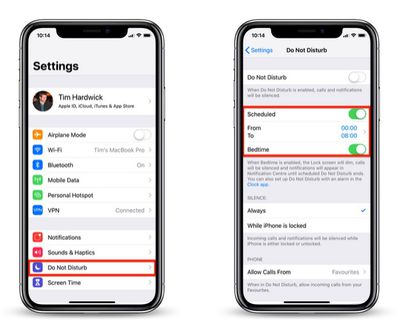
  1. Launch the Settings app on your iPhone.
    how to wake to a weather forecast on iphone lock screen 1

  2. Tap Do Not Disturb.
  3. Make sure the Scheduled and Bedtime buttons are toggled on so that they're both green.
  4. You can also set your sleep and wake schedule here by adjusting the From and To times.
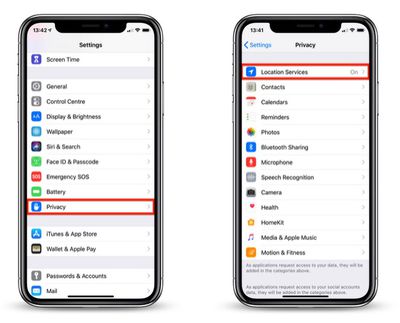
  5. Return to the main Settings screen and tap Privacy.
    how to wake to a weather forecast on iphone lock screen 2

  6. Tap Location Services.
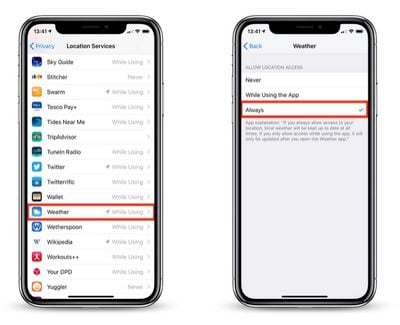
  7. Tap Weather in the list of apps.
    how to wake to a weather forecast on iphone lock screen 3

  8. Under Allow Location Access, tap Always.
  9. Exit the Settings app.

With that done, next time it's time to wake up and Bedtime Mode is scheduled to go off, your iPhone will display the usual "Good morning!" message along with the day's weather, including the current temperature, weather conditions, and forecast.

To make the forecast vanish from your Lock Screen, simply tap Dismiss. To switch the temperature scale between Celsius and Fahrenheit, launch the Weather app and scroll to the bottom of the weather locations list, where you'll find the option to do so.

It's worth noting that once you unlock your iPhone, the weather forecast will disappear for the rest of the day, and it won't return until the next day when you wake up and access the device after Bedtime mode has turned itself off.

As it stands, the Lock Screen weather feature offers no other flexibility, and it won't work unless you allow the Weather app to always access your location data. Hopefully Apple will eventually change this to make it a more useful Lock Screen "widget" in a future update to iOS.


Top Rated Comments

102 months ago
My wife showed this to me the other day. She was excited that she knew something about the iPhone that I didn’t.
Score: 10 Votes (Like | Disagree)
102 months ago
That would be great if the weather app apple use isn’t from weather channel. What a terrible service. Something like meteo weather for Europe would be much better / or the equivalent in US. Weather channel is less than useless for ACURATE weather. It’s mosly 3-4 desgrees off, rain warnings are usually just basic or to cover all bases, what’s the point. Partner up with some real meteorological firms and do it right, ive never understood why apple can’t get the weather app right, i mean yahoo? Seriously? That was good right?!
Score: 9 Votes (Like | Disagree)
102 months ago
I’m personally not a fan of DND Bedtime. It silences everything to include other alarms and is not great for people who have changing bedtime schedules. It’s too bad this weather feature only work with bedtime mode.
Score: 5 Votes (Like | Disagree)
oneMadRssn Avatar
102 months ago
That would be great if the weather app apple use isn’t from weather channel. What a terrible service. Something like meteo weather for Europe would be much better / or the equivalent in US. Weather channel is less than useless for ACURATE weather. It’s mosly 3-4 desgrees off, rain warnings are usually just basic or to cover all bases, what’s the point. Partner up with some real meteorological firms and do it right, ive never understood why apple can’t get the weather app right, i mean yahoo? Seriously? That was good right?!
I think the problem is for-profit weather forecasting. It incentivizes click-bait weather reports. In my area, Weather Channel is always forecasting a huge storm coming up sometime this week, but as the day approaches it is downgraded or the forecast is changed and hey look a huge storm is coming next week now.

I wish there was a good app with a solid Apple-like UI that just scrubbed the forecast from NOAA/NWS.
[doublepost=1543851446][/doublepost]
It silences everything to include other alarms
This should be added to the article. It sure would stink for someone to miss their one-time early alarm while traveling or something because they followed MacRumor's instructions.

Score: 4 Votes (Like | Disagree)
ghostface147 Avatar
102 months ago
I like this feature, but wish it wasn't a one time thing. Once you see it, you won't see it again until the next day. Or leave it as a widget!
Score: 3 Votes (Like | Disagree)
PhillyGuy72 Avatar
102 months ago
Took a few tries a few months ago to finally get this to show up. Cool feature, but it's extremely brief.

Would love a simple setting where you can have this always on - all day or maybe a custom time setting
(Ex. between 7am-11:59am. Or whatever time frame you want)
Score: 2 Votes (Like | Disagree)

Popular Stories

iOS 27 Next to iPhone

Here's When iOS 27 Rolls Out Today in Every Time Zone [Update: It's Out]

Sunday September 13, 2026 3:00 am PDT by
Update 10:04 a.m.: iOS 27 is rolling out now, though it may take a bit for all users to see it, so keep checking! Apple is about to release iOS 27, which will finally deliver more advanced Siri AI capabilities as well as a variety of other refinements, improvements, and new features to iPhones. It's Apple's biggest software update of the year, and Apple announced at Wednesday's iPhone event...
iOS 27 Icon iPhone

iOS 27 Available Now With These 8 New Features

Monday September 14, 2026 9:00 am PDT by
Update — 10 a.m. Pacific Time: Apple has released iOS 27. During its iPhone 18 Pro and iPhone Duo event last week, Apple announced that iOS 27 will be released widely on Monday, September 14. iOS 27 should be available around 10 a.m. Pacific Time / 1 p.m. Eastern Time today via the Settings app, under General → Software Update. Below, we have highlighted eight new features and...
Apple iCloud Plus expansion hero

iCloud+ Now Includes Apple TV, Apple Arcade, and Curated Apple Music Stations in Over 100 Countries

Tuesday September 15, 2026 1:43 am PDT by
Apple today announced a new subscription initiative that turns paid iCloud+ subscriptions into a broader services bundle in more than 100 countries. In select countries, Apple says every paid iCloud+ plan, including the cheapest 50GB tier, now includes Apple TV and Apple Arcade "at no additional cost," while family sharing extends the storage, TV and Arcade access to up to five people....