

iOS 17: How to Share Photos in Apple's Revamped Messages App - MacRumorsOpen MenuShow RoundupsShow Forums menuVisit ForumsOpen Sidebar
Skip to Content

iOS 17: How to Share Photos in Apple's Revamped Messages App

by

In iOS 17, Apple has added several new Messages features and tweaked the interface design of the Messages app to give it a cleaner look. This means that the way you navigate and perform certain actions in the messaging app has changed quite a bit.

iOS 17 Messages Feature
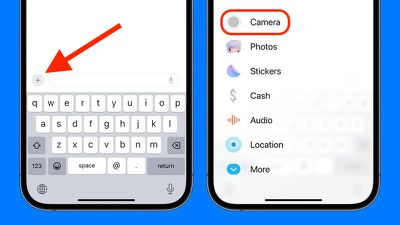
For example, previously in iOS 16, sharing photos involved tapping the Photos icon in the row of apps below the text input field to access your Camera Roll. But in iOS 17 both the camera and ‌Photos‌ buttons are gone, and all you have to tap is a + button to the left of the text field.

This + button brings up a vertical list of options, at the top of which are the Camera and ‌Photos‌ buttons. Compared to the row of app icons that consolidated all options in iOS 16, this makes for a much more simplified design, since it's easier to tell what's what with the larger icons and text descriptions.
ios 17 messages send photos
However, it's hard to overlook the fact that accessing your photos now seems to involve two steps instead of one. Thankfully though, that need not be the case, because if you press and hold the + button next to the text input field, you will be dropped straight into your iPhone's Camera Roll, ready to select the pictures you want to send.

messages
In iOS 17, Messages may have changed its look and feel, but the interface is actually now more customizable. You can, for instance, organize your iMessage apps and manage iMessage sticker packs right within the app. Click the links to learn how.


Popular Stories

macOS 27 on MacBook Pro

Apple Says macOS 27 Won't Be Compatible With These Macs

Wednesday June 3, 2026 8:29 am PDT by
During WWDC 2025, Apple revealed that macOS 26 Tahoe would be the final major macOS version for Intel-based Macs. macOS 27 will be compatible with Apple silicon Macs only, meaning that you will need a Mac with an M-series chip or a MacBook Neo with an A18 Pro chip in order to install the software update. Apple will unveil macOS 27 during its WWDC 2026 keynote this Monday, June 8, and the...
MacBook Neo on Yellow Feature

MacBook Neo is So Popular That Apple Reportedly Doubled Production

Wednesday June 3, 2026 9:24 am PDT by
On an earnings call in late April, Apple's CEO Tim Cook said that customer response to the MacBook Neo was "off the charts," and the popularity of the laptop has reportedly led the company to significantly boost production. Apple supply chain analyst Ming-Chi Kuo this week said he believes that MacBook Neo shipments to Apple were doubled from an initial target of 5 million units to 10...
iphone 18 pro blue%402x

iPhone 18 Pro: Dark Cherry, Light Blue, and Dark Gray Chassis Leaked [Update]

Thursday June 4, 2026 5:18 am PDT by
Update: Since publication, new information has come to light suggesting the images have been AI-manipulated and are not in fact iPhone 18 Pro chassis parts. The original article follows. The color options Apple is reportedly planning for the upcoming iPhone 18 Pro and ‌iPhone 18 Pro‌ Max have appeared online today in the form of images of chassis parts of unknown authenticity....















