How to Use Two HomePods With a Mac for Stereo Audio Output - MacRumorsOpen MenuShow RoundupsShow Forums menuVisit ForumsOpen Sidebar
Skip to Content

How to Use Two HomePods With a Mac for Stereo Audio Output

by

If your Mac is running macOS Big Sur 11.3 or later, you can use a HomePod stereo pair as your Mac's system audio output. This article explains how to set up two ‌HomePod‌ speakers as a stereo pair and then connect them to your Mac.
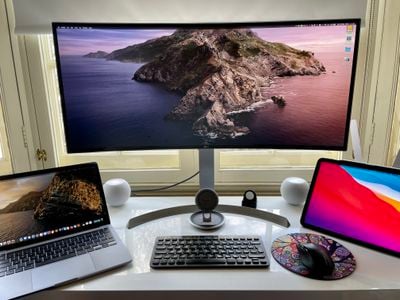
homepod mini stereo pair mac
Dedicated stereo speakers are always going to provide a better listening experience than relying on your Mac's built-in speakers for audio, so it makes sense that some people will be interested in using two HomePods as a stereo pair to create a wider soundstage for richer, more enveloping sound.

In previous versions of macOS, such a setup had a glaring limitation: HomePods set up as a stereo pair could only be used in the Music app and other apps that support AirPlay. In other words, it was only possible to select separate ‌HomePod‌ speakers from the menu bar on a Mac, which meant using stereo-paired ‌‌HomePod‌‌ speakers as your Mac's audio output device was a non-starter.
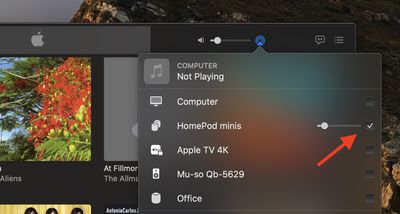
homepod stereo pair music mac
Fortunately, Apple fixed this omission in macOS Big Sur 11.3, and it's now possible to use a ‌HomePod‌ stereo pair as you default audio output on a Mac. Note that system sounds will remain playing only on your Mac's built-in speakers.

Stereo-paired HomePods can already be set as an audio output option on iPhone, iPad, and Apple TV, so the update brings the same functionality to the Mac. Note that stereo pairing is available with two HomePods or two ‌‌HomePod‌‌ minis, but the ‌‌HomePod‌‌ and ‌HomePod‌ mini can't be paired together.

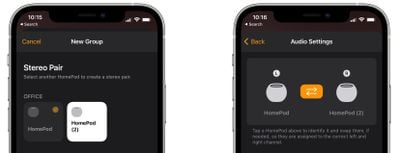
You can join two ‌‌HomePod‌‌ speakers as a stereo pair when you initially set up ‌‌HomePod‌‌, or you can later join two speakers that you’ve already set up using the Home app. Keep reading to learn how it's done.

How to Create a HomePod or HomePod Mini Stereo Pair

  1. Launch the Home app on your iPhone or ‌iPad‌.
  2. Make sure both HomePod speakers are in the same room.
  3. Touch and hold one of the HomePods.
  4. Swipe up and tap the cog icon in the bottom-right corner of the screen.
  5. Tap Create Stereo Pair....
    home

  6. Select the other ‌HomePod‌ that you want to use.
  7. In the last screen, tap a ‌HomePod‌ to identify it via a tone, and swap the and right channels if needed.
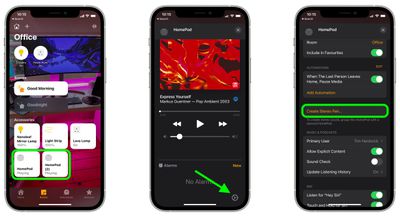
    home

Once you've paired the two ‌HomePod‌ speakers, you'll see a single pane in the Home app representing the stereo pair.

How to Select a HomePod Stereo Pair As Your Mac's Audio Output

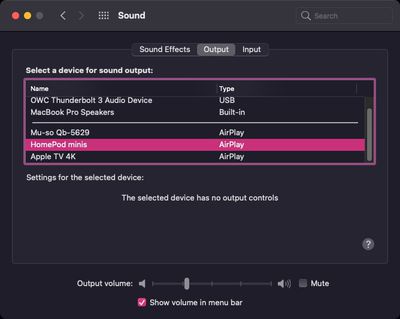
This is the easy part. Once you've set up your stereo pair in the Home app, you should be able to select them as your Mac's default audio output, just like any other speaker.

There are two ways to do this. You can click the sound icon in the menu bar and select your paired HomePods from there.
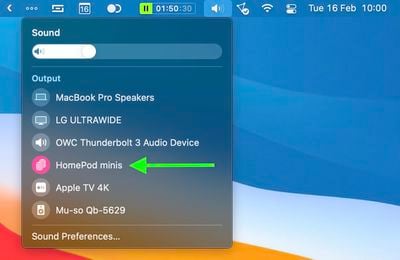
homepod stereo pair big sur menu bar
Alternatively, launch System Preferences, click the Sound pane, and select your HomePods in the ‌AirPlay‌ section of the devices list.

sys prefs
It's worth bearing in mind that when two ‌‌HomePod‌‌ speakers are joined, only one responds to Siri requests, plays alarms, and acts as a speakerphone.

Tip: If you own an ‌Apple TV‌ 4K and two ‌HomePod‌ speakers, you can create a theater experience with Dolby Atmos or surround sound right in your home.
Related Roundups: HomePod, HomePod mini 2

Top Rated Comments

72 months ago
And what about a 2-3 second lag between the video and audio on FaceTime or Zoom calls? Why is there no mention of this “feature,” which renders a stereo pair of HomePods useless as computer speakers? Yes, this is still happening with macOS 11.3 and the HomePod Minis running 14.5.
Score: 29 Votes (Like | Disagree)
72 months ago
What a hassle!
If you enjoy Music then get yourself some good Bookshelf Speakers and an AMP to drive it! (Additionally you don't have to deal with compressed Audio via AirPlay)
Even with you watch Youtube and skip the timeline, you will always have the 2-3 seconds sync delay!

Cable is Cable!
Score: 12 Votes (Like | Disagree)
72 months ago
Once I tested a pair of HomePod Minis running 14.5 with macOS 11.3 and confirmed that the 2-3 second lag with audio is still present, I ordered a pair of Pebble V3 speakers by Creative for $40. The speakers have Bluetooth 5.0, USB-C, and analog Aux inputs. The reviews are great. I will test them with Bluetooth to see if there’s a lag in audio. If there is, I will use USB-C or Aux cable.

I’m returning my HomePod Minis and I’m done with HomePods. From now on, it’s wired or Bluetooth speakers for me to be used as computer speakers, and it’s Sonos for high-quality music. Apple has screwed up another one of their promising product lines. It’s no wonder Sonos was completely unphased by Apple when the HomePod was first released. They knew that Apple would screw up the HomePod and were not threatened by the HomePod at all.
Score: 7 Votes (Like | Disagree)
72 months ago
While I am enthusiastic about the sound quality of my Homepod mini (I really did not expect this out of a $100, smallish speaker), there are many small issues that makes them almost impractical.
First, there is the 2 or 3 seconds lag that makes them useless for any real-time task (video conferencing, video, and probably gaming). As a consequence, I move back and forth between computer output (for meetings) to Homepod mini (for music while working).
Second, the connection also takes about 5 to 10 seconds and often just does not work so I have to try again. And recently, while playing the connection just stopped and would not come back until I reboot the laptop.

This is a very promising device when considering sound quality, form factor, and price point. But a lot of work remains to be done to make it really practical.
Score: 7 Votes (Like | Disagree)
72 months ago
It mustn’t be much of a view out of that window…
Score: 7 Votes (Like | Disagree)
getheo Avatar
72 months ago
From the iphone (youtube or safari), the stereo homepods work without lag. From the macbook, there is lag. Maybe it is not hardware limitation and they can fix it.
Score: 4 Votes (Like | Disagree)

Popular Stories

Apple TV 4K HomeView HomePod Mini tweaked

New Apple TV 4K, HomeView, and HomePod Mini: 16 Details Just Leaked

Sunday October 11, 2026 12:56 pm PDT by
Just two days before Apple's "Welcome home" experience in New York, Bloomberg's Mark Gurman has leaked several details about the new products set to be unveiled, including an all-new smart home hub, a HomePod mini 2, and a new Apple TV 4K. Here is an all-in-one summary of the details shared by Gurman:Apple's home hub with a touch-enabled display will be named HomeView, seemingly confirming a ...
iPad mini 7 Review Thumb 1 sans text

Apple Expected to Release New Products on Next Four Fridays

Sunday October 18, 2026 11:01 am PDT by
Apple likely plans to release MacBook Pro models with OLED displays, 14-inch MacBook Pro and iMac models with M6 chips, and/or an iPad mini 8 with an OLED display on Friday, November 6, according to Bloomberg's Mark Gurman. The devices are expected to be announced on Tuesday, October 27 or Wednesday, October 28. If this timeframe proves to be accurate, then Apple will be releasing new...
homepod mini 2 feature6

Apple Announces $149 HomePod Mini 2 With Siri AI, 'Sound Glow', and Four-Speaker Surround Sound

Tuesday October 13, 2026 6:11 am PDT by
Apple today announced a new HomePod mini equipped with Siri AI, new colors, and improved audio experiences. The new HomePod mini has an S10 chip that supports advanced computational audio, and Apple says it optimizes dynamic range, loudness, and acoustic performance in real-time. A Sound Glow feature turns the HomePod mini's top into a "visual canvas" that glows and animates in sync with...


Latest Stories
Satechi Offers MacRumors Readers 30% Off Select Accessories in Early Black Friday Sale
6 minutes ago
Leaker Envisions a Shorter iPhone With a New iOS Layout
33 minutes ago
Apple to Give You More Control Over When Your Mac Passwords Lock
1 hour ago
Siri Is Getting a Better Memory
2 hours ago
iPhone 18e Could Feature Bigger Display and Battery
2 hours ago
Apple's Siri Boss May Leave - Here's Who Could Take Over
3 hours ago
Apple Launching Two More New Products This Friday
3 hours ago
Apple Store Subscription Sign-Up Controversy Exposed
12 hours ago
Siri AI Rumored to Become 'More Like an Agent' as Early as Next Year
22 hours ago
Apple Taking New Approach to Developing iOS 28 and macOS 28
23 hours ago
Early Apple Black Friday Deals on Apple Watch, MacBook Air, and More
2 days ago
'Backglow' Lets You Customize New MacBook Pro's Glowing Apple Logo
2 days ago
Top Stories: Apple Product Launches, iOS 27.3 Beta, and More
2 days ago
More Fun iPhone Duo Apps: 30 New Picks to Try
3 days ago
Hands-On With Apple's New OLED Touchscreen MacBook Pro
3 days ago
Apple Store With All-New Design Opening Soon in Southern California
3 days ago
Control the Glowing Apple Logo on Your New MacBook Pro
3 days ago
Apple Shares New 'Apple Card: Apply and Use in Minutes' Ad
3 days ago
Apple Says More Than 100,000 Apps Optimized for iPhone Duo, Here's What's Still Missing
3 days ago
Early Black Friday Deals Kickoff With Steep Discounts on Apple Watch Ultras and More
3 days ago
The MacRumors Show: iOS 27.3 Looks Like a Huge Update
3 days ago
Best Buy's Black Friday Event Begins With Sitewide Savings on Apple, TVs, More
3 days ago
Apple Releasing Yet Another Two New Products Next Week
3 days ago
MacBook Air Drops to Lowest Price in Months With Amazon's $250 Discount
3 days ago
Apple Rumored to Drop the iPhone's Action Button Next Year
3 days ago
Apple's Extended Return Policy Now in Effect for 2026 Holiday Season
3 days ago
Apple Music Classical Updated With New Icon and Refreshed Design
3 days ago
OLED iPad Mini, M6 iMac, and New MacBook Pros Available From Today
3 days ago
Apple Surveys iPhone Duo Buyers About Crease and Camera
4 days ago
Apple's First Touchscreen Mac is Now Arriving to Customers
4 days ago