iOS 14.5: How to Automatically Download New Podcast Episodes and Follow Shows - MacRumorsOpen MenuShow RoundupsShow Forums menuVisit ForumsOpen Sidebar
Skip to Content

iOS 14.5: How to Automatically Download New Podcast Episodes and Follow Shows

by

In iOS 14.5, Apple has made some notable changes to its native Podcasts app. Some of these changes reflect the fact that Apple announced an optional paid podcast subscription service (beginning May 2021), while others are interface improvements to make it easier to find, follow, and listen to new episodes.
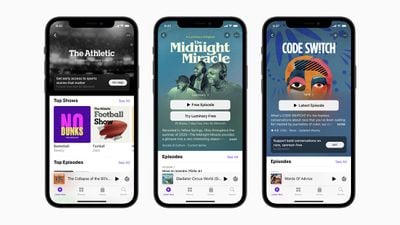
Apple Podcasts iOS 14 5
One example of these changes is the new Smart play button, which is designed to help you automatically start episodic shows from the latest episode and serialized shows from the beginning of each series. The Smart play button also display Resume if you've already listened to some of an episode but have yet to finish it.

Another notable change is in the Search tab, which now offers quick access to Top Charts and categories below the search input field, much like Apple Music search. Other tweaks include larger podcast artwork and a rejigged show page that has a more logical arrangement and is more aesthetically appealing.
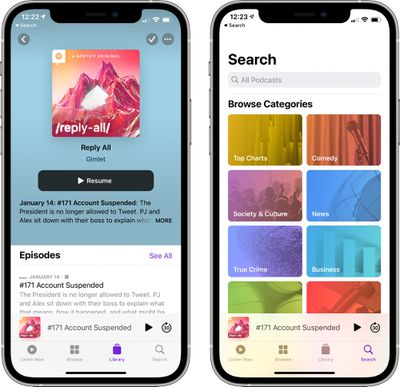
podcast app design changes
Perhaps most importantly, the way you "subscribe" to shows and download episodes has changed. Keep reading to learn how.

How to Follow Shows

In previous versions of iOS, you could "subscribe" to shows in Apple's Podcasts app. But now that Apple offers a paid podcast subscription mode, it has removed the "subscribe" language from the app entirely and replaced it with Follow options, which should make things less confusing.

Despite the new terminology, following a podcast offers the same functionality as subscribing had before it. Namely, it means that you'll stay up-to-date with new show episodes as they're published and you'll be able to download them individually.
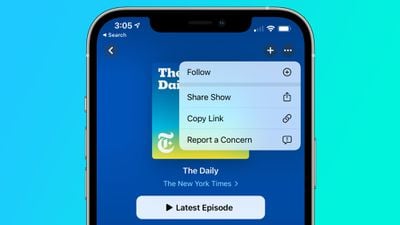
ios 14 5 podcasts
To follow a show, select one by browsing the Podcasts section, or search for one using the Search tab, then tap the plus (+) icon in the top-right corner of the Show's page.
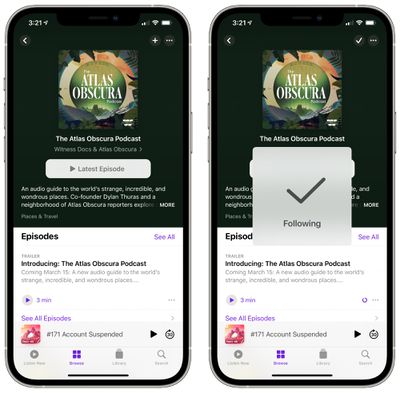
podcast app ios 14 5
To stop following a show, tap the tick icon and select Unfollow Show. You can also follow or unfollow shows by using the dropdown options that appear when you tap the More icon (three dots in a circle).

How to Automatically Download New Episodes

In previous versions of the Podcasts app, you had to add a show to your library before you could download new episodes. In iOS 14.5 and later, that's no longer the case, and you can download individual episodes right from a show's page.

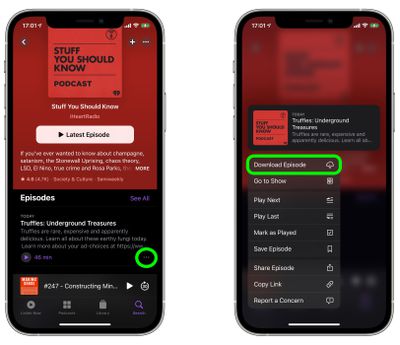
To download an episode, tap the ellipsis icon (three dots) to the right of its card and select Download Episode from the pop-up menu.
podcasts
Alternately, you can long press on an episode and the same pop-up menu will appear with the Download Episode option at the bottom. If the episode is already downloaded, the option appears as Remove Download instead.

If you're already following a show, you can turn off automatic downloads: Tap the tick icon at the top of a show page and select Turn Off Automatic Downloads. To turn them back on again, tap the down arrow icon that replaced the tick icon, and select Turn On Automatic Downloads.


Related Forum: iOS 14

Top Rated Comments

Desmondhuz Avatar
72 months ago
The updated podcast app downloaded about 50 old episodes of shows I had already listened to and I had to manually delete them. Smh
Score: 8 Votes (Like | Disagree)
Jaro65 Avatar
72 months ago
At what point will we say, "enough with the darn subscriptions!"?
Score: 8 Votes (Like | Disagree)
FloatingBones Avatar
72 months ago
Overcast works just fine for me. No thanks.

Score: 7 Votes (Like | Disagree)
72 months ago
Visually, the update is nice. However, as someone who did not subscribe to podcasts before, but rather had them in my library and I could manually add the episodes I wanted, I'm not loving the new "follow" feature. Despite going into Settings and turning off automatic downloads, every episode I play is downloaded.

I also really don't like that you can't delete episodes of "followed" podcasts from your feed. You can only mark them as played.
Score: 5 Votes (Like | Disagree)
macfacts Avatar
72 months ago

The updated podcast app downloaded about 50 old episodes of shows I had already listened to and I had to manually delete them. Smh
Apple respects your privacy, they have no idea what you listened to.
Score: 3 Votes (Like | Disagree)
72 months ago

Visually, the update is nice. However, as someone who did not subscribe to podcasts before, but rather had them in my library and I could manually add the episodes I wanted, I'm not loving the new "follow" feature. Despite going into Settings and turning off automatic downloads, every episode I play is downloaded.
I also really don't like that you can't delete episodes of "followed" podcasts from your feed. You can only mark them as played.
Glad I'm not the only one that hates this. Did Apple actually let people try this out before launching it? This update sucks.
Score: 3 Votes (Like | Disagree)

Popular Stories

duo aquarium

More Fun iPhone Duo Apps: 30 New Picks to Try

Friday November 6, 2026 3:27 pm PST by
When the iPhone Duo launched, we shared a list of some of the fun apps developers created for the new form factor. Two weeks out, developers are continuing to come up with fresh ideas, so we thought we'd share some of our favorites. Games Marbles Unhinged ($2.99) - Marbles Unhinged is a marble maze designed for the Duo. When you fold it, the floor turns into a ramp. If you stand the top...
apple pro tell logo

Apple Launching Five New Products Today

Thursday November 5, 2026 12:59 am PST by
Apple is launching five new products on Friday, November 6, following pre-orders that opened last week, including its first touchscreen MacBook Pro models. The following new products will be available from today: iPad mini with OLED display and A20 Pro chip iMac with M6 chip 14-inch MacBook Pro with M6 chip 14-inch MacBook Pro with OLED touchscreen 16-inch MacBook Pro with OLED...
iOS 28 AI

Apple Taking New Approach to Developing iOS 28 and macOS 28

Sunday November 8, 2026 7:42 am PST by
Apple has made a change to its development process for iOS 28, macOS 28, and corresponding software updates, according to Bloomberg's Mark Gurman. In his Power On newsletter today, he said Apple separates development of each year's new operating systems into three major stages. Typically, he said each stage consists of four weeks of coding followed by a four-week "convergence" period where...
Latest Stories
Apple Store Subscription Sign-Up Controversy Exposed
7 hours ago
Siri AI Rumored to Become 'More Like an Agent' as Early as Next Year
17 hours ago
Apple Taking New Approach to Developing iOS 28 and macOS 28
18 hours ago
Early Apple Black Friday Deals on Apple Watch, MacBook Air, and More
2 days ago
'Backglow' Lets You Customize New MacBook Pro's Glowing Apple Logo
2 days ago
Top Stories: Apple Product Launches, iOS 27.3 Beta, and More
2 days ago
More Fun iPhone Duo Apps: 30 New Picks to Try
2 days ago
Hands-On With Apple's New OLED Touchscreen MacBook Pro
3 days ago
Apple Store With All-New Design Opening Soon in Southern California
3 days ago
Control the Glowing Apple Logo on Your New MacBook Pro
3 days ago
Apple Shares New 'Apple Card: Apply and Use in Minutes' Ad
3 days ago
Apple Says More Than 100,000 Apps Optimized for iPhone Duo, Here's What's Still Missing
3 days ago
Early Black Friday Deals Kickoff With Steep Discounts on Apple Watch Ultras and More
3 days ago
The MacRumors Show: iOS 27.3 Looks Like a Huge Update
3 days ago
Best Buy's Black Friday Event Begins With Sitewide Savings on Apple, TVs, More
3 days ago
Apple Releasing Yet Another Two New Products Next Week
3 days ago
MacBook Air Drops to Lowest Price in Months With Amazon's $250 Discount
3 days ago
Apple Rumored to Drop the iPhone's Action Button Next Year
3 days ago
Apple's Extended Return Policy Now in Effect for 2026 Holiday Season
3 days ago
Apple Music Classical Updated With New Icon and Refreshed Design
3 days ago
OLED iPad Mini, M6 iMac, and New MacBook Pros Available From Today
3 days ago
Apple Surveys iPhone Duo Buyers About Crease and Camera
3 days ago
Apple's First Touchscreen Mac is Now Arriving to Customers
3 days ago
Claude Gets Personal Finance Feature With Bank Account Linking
3 days ago
Apple Arcade Adds Crossy Road Rush and NBA 2K27
4 days ago
Apple's New HomeView Smart Home Hub: Here's How Much RAM It Has
4 days ago
iPad Mini vs. iPad Air Buyer's Guide: Now Just $50 Apart
4 days ago
First iOS 27.3 and macOS Golden Gate 27.3 Public Betas Now Available
4 days ago
Apple Announces a New Mac Sales Record
4 days ago
Paid $200 for Logic Pro? Apple Says You Won't Get This New Feature
4 days ago








































