iOS 14.5: How to Report Speed Checks, Traffic Accidents, and Other Hazards in Apple Maps - MacRumorsOpen MenuShow RoundupsShow Forums menuVisit ForumsOpen Sidebar
Skip to Content

iOS 14.5: How to Report Speed Checks, Traffic Accidents, and Other Hazards in Apple Maps

by

In iOS 14.5 and later, Apple has added a Waze-like feature to its native Maps app that lets you report accidents, hazards, and speed checks along your route when getting directions. Keep reading to learn how it works.
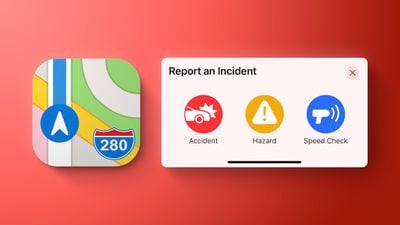
apple maps report incident red
Driving on public roads can throw up all sorts of hazards, but if you're given prior warning then you can be better prepared to deal with them. Apple recognizes this, which is why it allows you to report incidents in Maps for the benefit of other users. If you see something dangerous on your route that you want to warn others about, you can do so by following the steps below.

Note that the Report feature described here is also available through CarPlay, which should make it easier to report an incident when you're driving, when ideally you shouldn't be interacting with your phone.
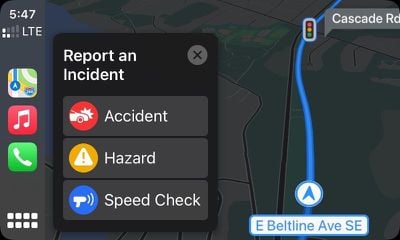
CarPlay

How to Report Speed Checks and Traffic Incidents in Apple Maps

  1. In Apple's Maps app, enter an address in the input field and select a route.
  2. Choose Go and start your journey.
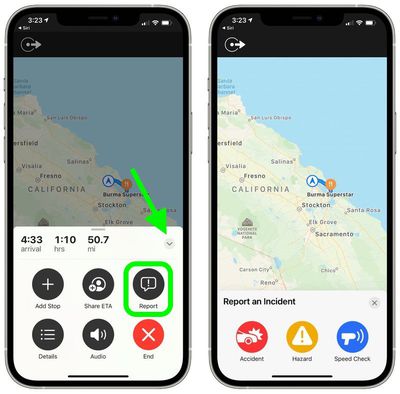
  3. If you come across a hazard, accident, or speed check, bring up the options card by tapping the chevron icon in the bottom-left corner of the screen.

  4. Tap the Report button in the menu card, then tap Accident, Hazard, or Speed Check. Alternately, say "Hey ‌Siri‌, there's an [accident/hazard/speed check]" and ‌‌Siri‌‌ will send in a report to ‌Apple Maps.
    maps

Reporting an incident flags the location with Apple, so it shouldn't be used except in a valid situation. If enough people file similar reports in the same location, Apple will use anonymized crowdsourcing to flag the incident site on the map.

Related Forum: iOS 14

Top Rated Comments

alexandr Avatar
68 months ago

Can't wait for the folks who will say "you shouldn't speed anyways." Right, like there's one person on the road that's never exceeded the ridiculously low speed limits the government wants us to follow. The government takes modern cars and wants us to drive them like we have clunkers from the 60's still. Waze and Apple wouldn't have a speed trap function if the government would get with the real world instead of their fantasy land.
you just said government 3 times in a post about speeding. just saying...
Score: 23 Votes (Like | Disagree)
countryside Avatar
68 months ago
It requires multiple reports? Hm. I get it for quality control, but in rural areas that may not happen.
Score: 17 Votes (Like | Disagree)
Truckondo Avatar
68 months ago
Kind of lame to have it work only when you have a set destination. I know where my local Target is so why we would I need directions? The road there has a nice little curve where the police like to hide out. It would be nice to say “speed trap ahead” and having it logged then to not do it at all.
Score: 16 Votes (Like | Disagree)
alexandr Avatar
68 months ago
man, if i try to report an accident while driving someone will be reporting about me in a minute...
Score: 15 Votes (Like | Disagree)
68 months ago

The government takes modern cars and wants us to drive them like we have clunkers from the 60's still. Waze and Apple wouldn't have a speed trap function if the government would get with the real world instead of their fantasy land.

Following the government's speed limits is like me having to purposely throttle my 2020 Mac's speed to match that of a computer back in 1989.
No it's not. Your car might have AWD, lane assistance, auto braking, night vision and whatnot - you still need to abide by the laws of physics and the human reaction time hasn't improved by a millisecond since the 1960's.

I live in a somewhat rural area. The rate of speed tourists from the city think is appropriate tells me they've never seen a moose.
Score: 14 Votes (Like | Disagree)
EightBitJoe Avatar
68 months ago

Can't wait for the folks who will say "you shouldn't speed anyways."
It'll happen. This is a forum full of sanctimonious Apple users, after all.
Score: 9 Votes (Like | Disagree)

Popular Stories

Apple Maps General

Apple Maps Flyover Gets a Visual Upgrade in iOS 27

Monday June 8, 2026 4:29 pm PDT by
Apple Maps is getting a visual update in iOS 27, with Apple planning to introduce new aerial imagery that's combined with Visual Intelligence models. Apple said everything will have sharper detail, from the "shapes of individual trees to the way light reflects off the glass of skyscrapers." Flyover is an Apple Maps view that lets users see more than 350 cities in 3D with detailed...
Apple Says iOS 27 Adds These 12 New Features to Your iPhone Feature

Apple Says iOS 27 Adds These 12 New Features to Your iPhone

Tuesday June 9, 2026 9:47 am PDT by
iOS 27's key new feature is a more intelligent and personal version of Siri, but the changes go well beyond that. In a press release, Apple outlined additional enhancements coming across Apple Maps, Find My, Apple Wallet, Apple Music, and more. Apple Maps has gained an enhanced Flyover experience powered by AI, enabling you to view aerial imagery in "stunning detail" for select cities. In ...
liquid glass app icon

Apple Maps to Get These 10 New Features in iOS 27

Thursday June 11, 2026 5:45 am PDT by
Apple Maps is getting a range of new features in iOS 27, headlined by an upgraded Flyover experience that uses AI to improve the realism and detail of its aerial imagery. Flyover is a longstanding feature of Apple Maps and lets users explore more than 350 cities in 3D with detailed landmarks, roads, parks, and buildings. Apple described the enhanced Flyover in iOS 27 as combining aerial...