

iOS 14.5: How to Recalibrate Your iPhone 11 Battery - MacRumorsOpen MenuShow RoundupsShow Forums menuVisit ForumsOpen Sidebar
Skip to Content

iOS 14.5: How to Recalibrate Your iPhone 11 Battery

by

With the release of iOS 14.5, Apple introduced a new process for recalibrating the battery health reporting on the iPhone 11, 11 Pro, and 11 Pro Max.
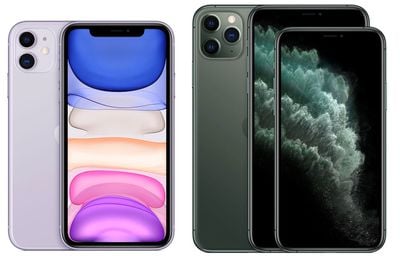
iphone 11 and 11 pro
The update recalibrates the maximum battery capacity and peak performance capacity on ‌‌iPhone 11‌‌ models to address inaccurate estimates of battery health reporting that some users have encountered.

Symptoms of this bug include unexpected battery drain behavior or in some cases, reduced peak performance capability, but these issues should be fixed after installing the update.

Once you've updated your iPhone 11 to iOS 14.5 or later (Settings -> General -> Software Update), you'll see a message in the Settings app under the Battery -> Battery Health section informing you of the recalibration process.
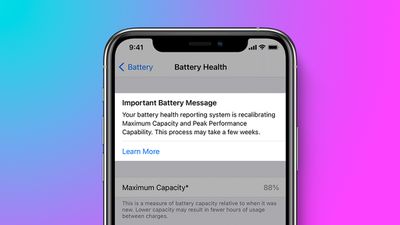
important battery message iphone 11
Note that the process can take a few weeks to complete after updating your device. This is because recalibration of the battery's maximum capacity and peak performance capability takes place over the course regular charge cycles.

It's also worth bearing in mind that the displayed maximum capacity percentage won't change during recalibration, and while peak performance capability might also be updated, it may not be noticeable.

Only when the recalibration is complete can the maximum capacity percentage and peak performance capability information be regarded as accurate. If the recalibration indicates that battery health has indeed significantly declined, you'll see a battery service message.

In some cases, your iPhone 11 battery's recalibration may not be successful and a battery service message will pop up. In such cases, Apple will replace affected batteries free of charge to restore full performance and capacity to your device.


Related Forums: iOS 14, iPhone

Top Rated Comments

68 months ago
This process is automatic. Why would you say “how to”?? Lol slow news day?
Score: 15 Votes (Like | Disagree)
CasinoOwl Avatar
68 months ago
So the answer to the headline "How to..." is to do nothing.
Score: 13 Votes (Like | Disagree)
Ikertxo40 Avatar
68 months ago
This feature is a joke. I went up from 88% to 100% with an iphone 11 pro from day 1. Coconut battery says I am at 90%, way more credible.
Score: 5 Votes (Like | Disagree)
68 months ago

This feature is a joke. I went up from 88% to 100% with an iphone 11 pro from day 1. Coconut battery says o am at 90%
How when it takes WEEKS to finish?
Score: 4 Votes (Like | Disagree)
Mistborn15 Avatar
68 months ago

Same here 88 to 100. When should be 90% like coconut battery program
Apple won't have to replace batteries and people can sell their 75% battery phones claiming it to be 95%. win-win for all :p
Score: 3 Votes (Like | Disagree)
Digital Dude Avatar
68 months ago
Now, this is the kind of engineering I expect from Apple. I guess I'll have to pull out a few pins from my Tim Cook Voodoo Doll.
Score: 3 Votes (Like | Disagree)

Popular Stories

iCloud iPhone 17 Pro

iPhone Users Who Pay for iCloud Storage Get Two New Perks on iOS 27

Thursday July 2, 2026 6:10 am PDT by
If you pay for certain iCloud+ storage plans beyond the 5GB that Apple offers for free, you will receive two more perks on iOS 27 at no additional cost. A summary of the two new iCloud+ perks on iOS 27:Increased daily usage limits for some new Apple Intelligence features, including image generation in the revamped Image Playground app. HomeKit Secure Video cameras receive generated video...
American Express Gold Apple Pay Feature

American Express Announces New Apple Pay Feature

Tuesday June 30, 2026 10:27 am PDT by
American Express today announced that you can now redeem Membership Rewards points when checking out with Apple Pay on the web and in apps on the iPhone and iPad. When checking out with Apple Pay on iOS 18 or iPadOS 18 or later, tap on your eligible American Express card (Platinum, Gold, Green, and others) and select the Membership Rewards points option. You can use points to cover all or...
series 10 apple watch titanium digital crown

Report: Apple Watch Redesign Coming Next Year With New Band System

Tuesday June 30, 2026 8:45 am PDT by
A "major overhaul" of the Apple Watch's design is due to arrive next year with a new system for connecting bands, according to a known Weibo leaker. In a set of recent posts, the leaker known as "Instant Digital" linked the new claim to older rumors about an "Apple Watch X" model, which was said to introduce a fresh design and break compatibility with the existing watch band system. Citing...















