iOS 14.5: How to Set a Preferred Music Streaming Service With Siri - MacRumorsOpen MenuShow RoundupsShow Forums menuVisit ForumsOpen Sidebar
Skip to Content

iOS 14.5: How to Set a Preferred Music Streaming Service With Siri

by

With the release of iOS 14.5, Apple introduced a feature that lets users select a specific music service to use with Siri, with the options including third-party services like Spotify in addition to Apple Music.
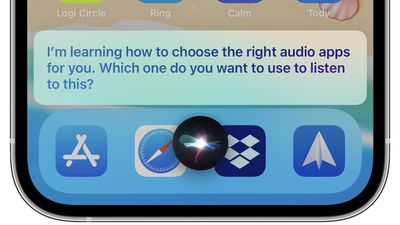
siri choose audio apps
When this feature first came to light in beta versions of iOS 14.5, many early reports interpreted it as Apple allowing users to select a default streaming service, similar to the way it allows email apps other than Apple's native Mail client to be selected as the system default.

However, Apple has since clarified that there isn't actually any option to choose a music service that will be selected on every occasion. More accurately, the feature in question uses ‌Siri‌ intelligence to learn from your listening habits and improve the music selection process over time.

In fact, by occasionally asking which service to use, ‌Siri‌ learns your preferences for all types of audio content rather than just music. For example, it will let you open podcasts in Apple Podcasts or a third-party podcasts app, and let you choose a specific audiobook app if you listen to audiobooks. Here's how it works.

  1. Ask ‌Siri‌ to play an artist, song, or album with a request like "Hey ‌Siri‌, play The Beatles."
  2. ‌Siri‌ will display a list of all music apps you have installed and will ask "Which app would you like to use?"
  3. Choose your preferred music app from the list.
    siri

  4. If asked, confirm that ‌Siri‌ can access data from your music app.
  5. From there, ‌Siri‌ will play the music in your app of choice. If you chose Spotify, for example, the music content will play in Spotify.
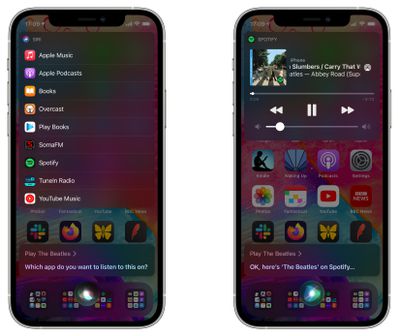
In past versions of iOS, it's been possible to play music from other services by clarifying which service you want ‌‌Siri‌‌ to use, such as "Hey ‌‌Siri‌‌, play music on Spotify," but the change implemented in iOS 14.5 makes it more likely that ‌‌Siri‌‌ will remember your music app of choice, so a simple command like "Hey ‌‌Siri‌‌ play music" will use your favorite app rather than defaulting to ‌‌Apple Music‌‌.

Top Rated Comments

Einkoro Avatar
66 months ago
“Sorry, something’s gone wrong. Please try again.”

Seems to work about as well as the rest of Siri.
Score: 12 Votes (Like | Disagree)
66 months ago
We still need a 'I own my music, stop looking at services' option....
Score: 6 Votes (Like | Disagree)
66 months ago

Why not just do this by default, but add a submenu for which one to play which type of content by default?

I don’t really understand the point either. If I want to listen to music I’ll say play music and the chosen default app would ideally be used. If I want to listen to a podcast I’d say play podcasts and again the default podcast app would be used. Or the only thing I use a lot of is audiobooks and I’d obviously ask Siri to play my audiobook.

They’re overthinking this one.
They clearly don’t want to you to set a default player for all your music. So they came up with this. We all know it will never work because Siri and learning are not two words that should ever be used in the same sentence.
Score: 4 Votes (Like | Disagree)
66 months ago
I feel like being able to manually choose default apps would be way more helpful
Score: 4 Votes (Like | Disagree)
chriscl Avatar
66 months ago
It just feels like Apple has begrudgingly added this option.

Why can there not be a simple option to select the default Music service to be used every single time ?

I use Spotify, I don't use any other service. I just want Spotify as the default for all music playback. How Hard can it be?

(and don’t get me started on the lack of native Spotify support on HomePod - but that’s down to Spotify, not Apple).
Score: 3 Votes (Like | Disagree)
Cory S Avatar
66 months ago
Why not just do this by default, but add a submenu for which one to play which type of content by default?

I don’t really understand the point either. If I want to listen to music I’ll say play music and the chosen default app would ideally be used. If I want to listen to a podcast I’d say play podcasts and again the default podcast app would be used. Or the only thing I use a lot of is audiobooks and I’d obviously ask Siri to play my audiobook.

They’re overthinking this one.
Score: 3 Votes (Like | Disagree)

Popular Stories

wwdc 2026 horizontal

WWDC 2026 Graphic Teases Major iOS 27 Feature

Sunday April 19, 2026 3:02 pm PDT by
Apple's WWDC 2026 graphic provides "a glimpse of the revamped Siri interface coming in iOS 27," according to Bloomberg's Mark Gurman. In his Power On newsletter today, Gurman said iOS 27 will include a new Siri interface in the Dynamic Island. When you trigger Siri, he said the Dynamic Island will show a "Search or Ask" prompt, and this will apparently be accompanied by a "glowing cursor"...
Gemini Siri Feature

Google Confirms Gemini-Powered Siri Coming Later This Year

Wednesday April 22, 2026 11:08 am PDT by
Google today commented on its partnership with Apple, confirming that Gemini will power a new, more personalized version of Siri that's set to be released later in 2026. Google Cloud chief Thomas Kurian mentioned the Apple partnership during Google Cloud Next 2026, a conference that's taking place in Las Vegas, Nevada today. Earlier this year, we announced a monumental partnership with one...
iOS 27 Mock Quick

iOS 27 Camera App to Get 'Siri' Mode With Nutrition Label Scanning

Wednesday April 29, 2026 9:54 am PDT by
Apple is planning to integrate Apple Intelligence and Siri into more of its apps in iOS 27, including the Camera app, reports Bloomberg. The iOS 27 Camera app will have a dedicated Siri mode that will be available alongside the existing Photo, Video, Portrait, and Panorama modes. When in Siri mode, the existing Camera app shutter button will feature the Apple Intelligence logo, letting users know ...