iOS 14.5: How to Use AirPlay 2 With Apple Fitness+ - MacRumorsOpen MenuShow RoundupsShow Forums menuVisit ForumsOpen Sidebar
Skip to Content

iOS 14.5: How to Use AirPlay 2 With Apple Fitness+

by

With the release of watchOS 7.4 and iOS 14.5, Apple has added AirPlay 2 support to the Apple Fitness+ app. That means Apple Fitness+ workouts can be streamed to ‌‌AirPlay‌‌ 2-compatible television sets from an iPhone or iPad, allowing workouts to be viewed on a larger screen without requiring an Apple TV.

fitness plus
‌AirPlay‌ 2-enabled TVs are available from a variety of brands, including Samsung, Sony, LG, and Vizio. Roku TVs sold by brands like TCL, Sharp, and Hisense also support ‌AirPlay‌ 2, or users can connect a Roku streaming stick to their existing smart TV via the HDMI port as a cost-effective way of streaming Apple Fitness+ workouts via ‌AirPlay‌ 2.

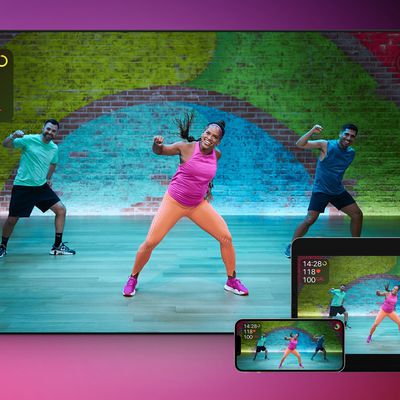
One thing to bear in mind when using Apple Fitness+ with ‌AirPlay‌ is that Apple Watch metrics aren't displayed on the screen as they are when using the service with an ‌Apple TV‌, iPhone, or ‌iPad‌. Activity rings, calories burned, workout time remaining, and burn bars won't show on your TV, but you can still glance at your connected Apple Watch and iPhone or ‌iPad‌ to view that info.

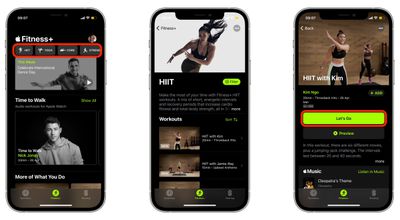
  1. Turn on your AirPlay-compatible television set and launch the Apple Fitness app on your iPhone or ‌iPad‌.
  2. Select a workout type, choose a workout type, then hit the green Let's Go button.
    fitness

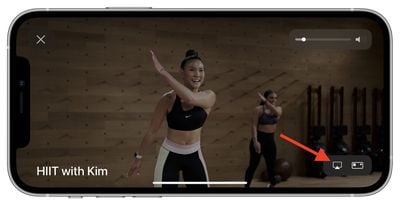
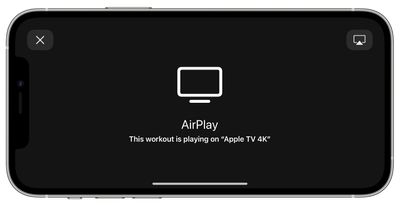
  3. Tap the ‌AirPlay‌ icon in the bottom-right corner of the workout loading screen and select your TV from the list of ‌AirPlay‌ options.
    fitness

  4. Continue following the workout on your television, and remember to check your Apple Watch for real-time metrics.
    airplay

For more helpful articles about the new features in iOS 14.5, be sure to check out our dedicated guide.

Top Rated Comments

FasterQuieter Avatar
68 months ago
I tried to like Apple Fitness+, but the forced smiles the instructors constantly wear near killed me. They'll need to hire some scowling Russians to draw me back in.
Score: 6 Votes (Like | Disagree)
68 months ago
I'm sure I'm not the only one who is annoyed by this, but why can't they have the metrics that are able to show up if you're using an Apple TV to show up when you're doing AirPlay? I'm sure there's some reason why, but I just don't understand why such a feature is being omitted if you're doing AirPlay as opposed to using an Apple TV for Fitness+...
Score: 2 Votes (Like | Disagree)
68 months ago
Why isn’t there an Apple fitness+ app for Apple TV?
Score: 2 Votes (Like | Disagree)
68 months ago
Now if only I could AirPlay it to my macbook or better yet, just access Fitness+ workouts on it natively.
Score: 1 Votes (Like | Disagree)
68 months ago
How happy the instructors look. LOL
Score: 1 Votes (Like | Disagree)
68 months ago

Why isn’t there an Apple fitness+ app for Apple TV?
There is. This feature is for those that do not have an Apple TV but have a compatible airplay device. certain smart TVs have airplay 2 etc
Score: 1 Votes (Like | Disagree)

Popular Stories

CarPlay Siri AI

Apple Announces New CarPlay Features on iOS 27, Including Video Apps

Monday June 8, 2026 4:17 pm PDT by
Back at WWDC 2025, Apple revealed that it was planning to allow CarPlay users to watch video via AirPlay in their vehicles while they are not driving, but we did not hear many specific details about this functionality until now. In a WWDC 2026 video aimed at developers, Apple said the CarPlay video feature is available in new vehicles that support it. When playing a video in an iPhone app...
Apple Fitness Plus iPhone Trio

Apple Highlights New Fitness+ Content

Friday June 12, 2026 7:16 am PDT by
Apple introduced new content in its Fitness+ subscription service this week, including a new menopause-focused workout program. Fitness+ gains "Strong Through Menopause," a progressive three-week program featuring weekly Yoga and Strength workouts designed to help users navigating perimenopause and menopause build strength, improve balance and mobility, and reduce stress. A new episode of...
iCloud iPhone 17 Pro

iPhone Users Who Pay for iCloud Storage Get Two New Perks on iOS 27

Thursday July 2, 2026 6:10 am PDT by
If you pay for certain iCloud+ storage plans beyond the 5GB that Apple offers for free, you will receive two more perks on iOS 27 at no additional cost. A summary of the two new iCloud+ perks on iOS 27:Increased daily usage limits for some new Apple Intelligence features, including image generation in the revamped Image Playground app. HomeKit Secure Video cameras receive generated video...