iOS 14.5: How to Print a Reminders List - MacRumorsOpen MenuShow RoundupsShow Forums menuVisit ForumsOpen Sidebar
Skip to Content

iOS 14.5: How to Print a Reminders List

by

reminders iconIn iOS 14.5, Apple added a much-requested feature to the Reminders app that arguably should have been there from the get-to: The ability to print your reminders lists.

It's unclear why Apple left it so late to bring a printing option to its native reminders app, but what matters is that it's finally available.

Now you can make hard copies of your reminders to use as a backup, for convenience, or simply to experience the pleasure of ticking off to-dos with a real pen.

The following steps show you how to get printing in Reminders.

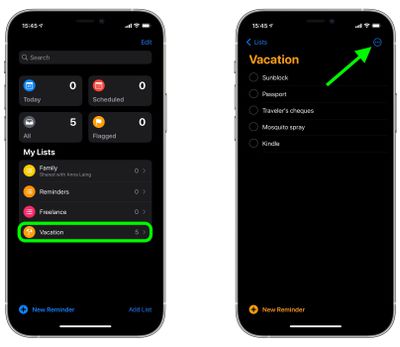
  1. Launch the Reminders app and using the main menu, select a reminders list or create a new one by tapping New Reminder.
  2. With your reminders list completed, tap the More icon (three dots in a circle) in the top-right corner of the screen.
    reminders

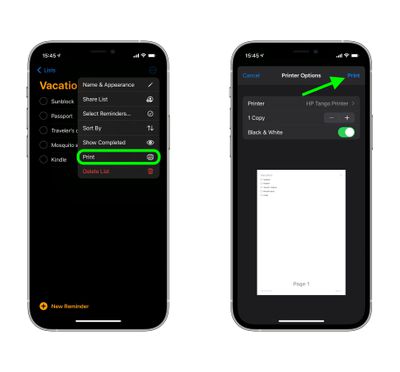
  3. Tap Print in the dropdown menu.
  4. Using the options, select the printer you want to use and the number of copies you want to print, and toggle the switch to select mono or color printing.
  5. If you're happy with the preview and chosen options, tap Print in the top-right corner of the screen.
    reminders

Bonus tip: iOS 14.5 introduces a new option to sort lists in Reminders by Due Date, Creation Date, Priority, or Title. You can access the Sort By option by tapping the same More icon you used to reveal the print option.


Related Forum: iOS 14

Top Rated Comments

Mrjetsondc Avatar
70 months ago

Does anyone else find Reminders too hard to use? I am very tech-savvy, but this app works best through Siri (which says something, as Siri is not the sharpest tool in the shed).

I have come to love Todoist ('https://todoist.com').
Listen buddy I don’t know what your malfunction is, but I’m a dog and even I know how to use the reminders app.
Score: 8 Votes (Like | Disagree)
70 months ago

I remember when everyone was hoping for a decent quick and easy sync option for the notes app so we could get our groceries & to-do lists sync'd to & from our Macs. After spending years not doing that simple thing, Apple came out with this Reminders app instead, which made doing simple things as convoluted of a process as possible, got a lot of complaining about being confusing, and opened the door to developers to make sensible apps, albeit disconnected ones, once the App Store launched.

Every once in a while I think to ask someone if they're taking down our meeting in their reminders, and I always get a "I don't use that" or "I have no idea what that app is for". I have no idea what the user base numbers are of that app, and I'm sure there are die-hard devotees here, but I've never once encountered someone that indicates they use it, so it seems anecdotally like the least popular app they make. ...I'm sort of amazed every OS release that reminders continues to exist.
Just because *you* don’t use it or know anyone that does, doesn’t mean people don’t use it.

I use it almost daily. One of my homepods is in my kitchen and when I need groceries, I just say “hey Siri, add blank to my shopping list*. Then when I go shopping it’s automatically there.
Score: 4 Votes (Like | Disagree)
jz0309 Avatar
70 months ago
Really? Printing a reminders list? What a waste of ink and paper…
Score: 4 Votes (Like | Disagree)
countryside Avatar
70 months ago
Does anyone else find Reminders too hard to use? I am very tech-savvy, but this app works best through Siri (which says something, as Siri is not the sharpest tool in the shed).

I have come to love Todoist ('https://todoist.com').
Score: 4 Votes (Like | Disagree)
Deliro Avatar
70 months ago
I still don’t get why Apple removed reminders from the calendar.
Score: 3 Votes (Like | Disagree)
LeadingHeat Avatar
70 months ago

It's unclear why Apple left it so late to bring a printing option to its native reminders app, but what matters is that it's finally available.
Really? It’s a much requested feature? This seems a bit dramatic, or maybe just the strong opinions of the writer of this article. I hadn’t heard anything of people moaning that it didn’t have the print feature until now.
Score: 2 Votes (Like | Disagree)

Popular Stories

iOS 27 Next to iPhone

Here's When iOS 27 Rolls Out Today in Every Time Zone [Update: It's Out]

Sunday September 13, 2026 3:00 am PDT by
Update 10:04 a.m.: iOS 27 is rolling out now, though it may take a bit for all users to see it, so keep checking! Apple is about to release iOS 27, which will finally deliver more advanced Siri AI capabilities as well as a variety of other refinements, improvements, and new features to iPhones. It's Apple's biggest software update of the year, and Apple announced at Wednesday's iPhone event...
iOS 27 Icon iPhone

iOS 27 Available Now With These 8 New Features

Monday September 14, 2026 9:00 am PDT by
Update — 10 a.m. Pacific Time: Apple has released iOS 27. During its iPhone 18 Pro and iPhone Duo event last week, Apple announced that iOS 27 will be released widely on Monday, September 14. iOS 27 should be available around 10 a.m. Pacific Time / 1 p.m. Eastern Time today via the Settings app, under General → Software Update. Below, we have highlighted eight new features and...
Apple iCloud Plus expansion hero

iCloud+ Now Includes Apple TV, Apple Arcade, and Curated Apple Music Stations in Over 100 Countries

Tuesday September 15, 2026 1:43 am PDT by
Apple today announced a new subscription initiative that turns paid iCloud+ subscriptions into a broader services bundle in more than 100 countries. In select countries, Apple says every paid iCloud+ plan, including the cheapest 50GB tier, now includes Apple TV and Apple Arcade "at no additional cost," while family sharing extends the storage, TV and Arcade access to up to five people....