With the new iPhone 11 and iPhone 11 Pro, Apple introduced updated dual and triple-lens camera systems, respectively, and added quite a few new camera features that are worth knowing about.
In our latest YouTube video, we've highlighted all of the most useful camera features and functions included in the iPhone 11 and 11 Pro for those who are coming from an older iPhone and want to know what's new.

Photos Outside the Frame
When you take a photo with the telephoto or wide-angle camera on the iPhone 11 Pro or the wide-angle lens on the iPhone 11, there's a feature that automatically captures what's outside the frame using one of the other lenses, just in case you accidentally cut something out.
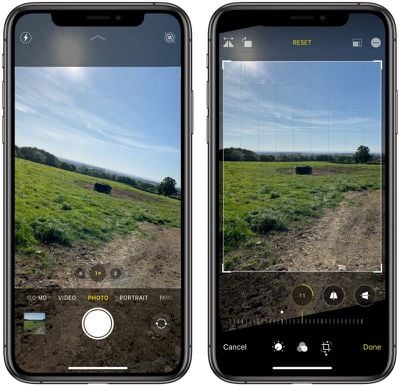
You can turn this on in the Camera section of the Settings app and take advantage of it when editing pictures in the Photos app. Any photo with a square icon and a star has more outside the frame that can be used when changing the crop of the photo. It's a bit of a niche feature, but it can come in handy for group shots, landscape images, architecture photos, and other situations where you might want to change the crop of the image after taking a picture.
Photos Outside the Frame doesn't work on all images all the time and you're not going to want to leave it on all the time because it disables another feature -- Deep Fusion.
Deep Fusion
When you upgrade to iOS 13.2, you'll get a new camera feature called Deep Fusion, which is something that works in the background and doesn't need to be turned on. Deep Fusion uses machine learning and the A13 chip in the iPhone 11 and 11 Pro for pixel-by-pixel processing of photos, optimizing for texture, details, and noise reduction in each part of an image.

You're going to notice it most in photos of people and pets where fabric, hair, and other such textures are prominent. Deep Fusion is designed to work primarily on indoor photos and in situations where the lighting is kind of at a medium level - not too bright and not so dark that Night Mode is engaged. Deep Fusion is automatic and can't be turned on or off, but it does get disabled when you have Photos Outside the Frame turned on.
Night Mode
Night Mode is one of the key features in the iPhone 11 and 11 Pro so you've heard of it and probably tried it out if you have one of the new iPhones, but there are a few little tips worth knowing.
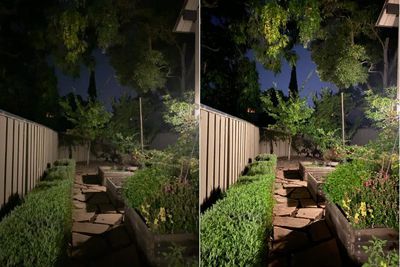
Night Mode comes on automatically in situations with low lighting, and you know that it's activated when you see a yellow icon at the top of the iPhone's camera with a little moon icon and a number.
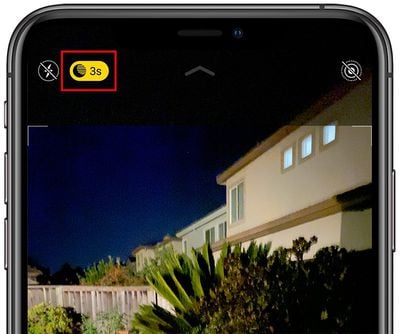
With Night Mode shots, Apple requires you to hold the camera steady for a few seconds while it takes multiple images of a scene to get the best possible lighting, so that number on the icon is the number of seconds that the shot will last.
Apple automatically selects the best exposure period based on the lighting conditions, but if you tap that moon icon, you can adjust the slider to the left to turn off Night Mode if desired or to the right to choose a longer exposure, which can slightly change the look of the photo.
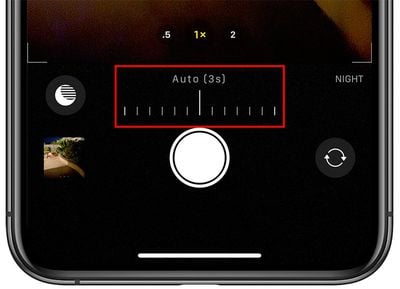
In general, Apple's default settings are good and most people aren't going to need to adjust their Night Mode exposure times. Knowing how to turn Night Mode off is useful, though, as there are times that you might want to get a quick night time shot.
To get the best Night Mode shots, make sure to hold your iPhone as steady as possible for the recommended number of seconds, and choose a scene with a subject that isn't moving much.
Live Photos
In iOS 13 Apple will automatically group Live Photos in succession together, letting you watch them video style. If you have several Live Photos that you took at one time, you can press on the first of the bunch and it will show you the playback from all of the Live Photos that you took rather than just the few seconds from a single Live Photo.
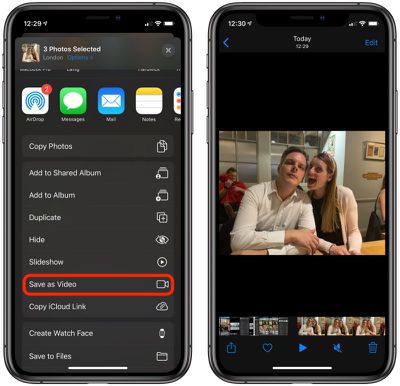
You can also select all of the Live Photos that you took, tap on the Share icon (square with an arrow through it) and then choose to save that as a video.
This probably isn't a feature that you'll use too often, but it's nice to know that it's available if you've done something like take a bunch of photos of a pet or child and want to turn it into a little video instead.
These Live Photos changes are available on the iPhone 11 and 11 Pro, but can also be used on older iPhones running iOS 13.
Quick Take
The iPhone 11 and 11 Pro have a neat Quick Take feature that makes it easy to take a video without having to swap over into video mode. If you're shooting photos and decide to make a video instead, just hold down on the shutter button and it will start recording.
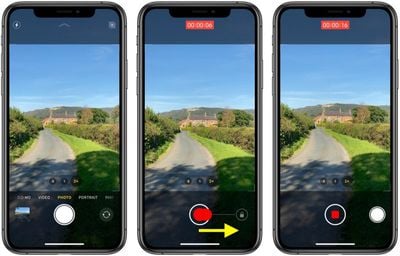
If you want to keep recording for more than a few seconds, keep holding and swipe over to the right side of the screen to continue the video in the video mode.
QuickTake videos are recorded at 1920 x 1440 resolution at 30 frames per second in the 4:3 aspect ratio. Videos are 1440 x 1440 resolution when using the square aspect ratio, and 1920 x 1080 in 16:9 aspect ratio.
Burst Mode
Holding down the shutter button is actually how Burst Mode works in older iPhones, so if you're missing Burst Mode, don't worry, there's still a method to use it.
Hold down the shutter button for Quick Take mode and then just swipe over to the left instead of the right to activate Burst Mode. Burst Mode takes multiple photos in quick succession and then lets you choose the best of the bunch.
Portrait Mode
When using Portrait Mode on the iPhone 11 Pro and iPhone 11 Pro Max, you're no longer limited to just one lens. On the iPhone XS and XS Max, only the telephoto lens worked with Portrait Mode, but with the new iPhones, Portrait Mode works with both the telephoto and wide-angle lenses.
To swap lenses, swipe over into Portrait Mode, and then tap on the little "2x" or "1x" icons on the left side of the screen to zoom in or out. Using 1x mode will let you fit more into the photo and it's perfect for scenes with multiple people or objects, while 2x mode is great for zooming in on a single person, pet, or other item.
The iPhone 11 doesn't have a telephoto lens, so it is limited to the wide-angle lens and no zooming in is possible.
Wider Selfies
The front-facing camera has also been updated with an option that lets you get more in the frame, which is perfect for group selfie shots.
With the front-facing camera activated, tap on the little arrow towards the bottom of the screen to zoom in or zoom out. Zooming in and out only works in standard Photo mode, and you can't use it with front-facing Portraits.
iPhone 11 and iPhone 11 Pro Camera How Tos
- How to Use the New Camera Lenses on the iPhone 11, iPhone 11 Pro, and iPhone 11 Pro Max
- How to Access the Camera Timer on iPhone 11 and iPhone 11 Pro/a
- How to Quickly Shoot Video Using QuickTake on iPhone 11 and iPhone 11 Pro
- How to Take Photos Using Night Mode on iPhone 11, iPhone 11 Pro, and iPhone 11 Pro Max
- How to Take Burst Photos on iPhone 11, iPhone 11 Pro, and iPhone 11 Pro Max
- How to Select Camera Aspect Ratio on iPhone 11, iPhone 11 Pro, and iPhone 11 Pro Max
- How to Improve Photo and Video Composition Without Cropping on iPhone 11 and iPhone 11 Pro
- How to Switch Focal Lengths in Portrait Mode on iPhone 11 Pro and iPhone 11 Pro Max
- How to Use Camera Filters on iPhone 11, iPhone 11 Pro, and iPhone 11 Pro Max
- How to Take a Slow-mo Selfie or 'Slofie' on iPhone 11, iPhone 11 Pro, and iPhone 11 Pro Max
- How to Use Live Photos on iPhone and iPad
- How to Change Video Quality in the Camera App on iPhone 11 and 11 Pro
More iPhone 11 and iPhone 11 Pro Tips
For more on what's new in the iPhone 11 and the iPhone 11 Pro, make sure to check out our dedicated roundups (linked above) that go over all of the features in the new devices.
Guide Feedback
Have questions about iPhone 11 and 11 Pro camera features or want to offer feedback on this guide? Send us an email here.