iOS 17: How to Turn Your Photo Subjects into Message Stickers - MacRumorsOpen MenuShow RoundupsShow Forums menuVisit ForumsOpen Sidebar
Skip to Content

iOS 17: How to Turn Your Photo Subjects into Message Stickers

by

Apple in ‌iOS 16‌ introduced a Remove Subject From Background option for photos on your iPhone, and in ‌iOS 17‌, you can also use the feature to create and save your own stickers. Keep reading to learn how it works.
iOS 17 Message Stickers Feature
In iOS 16, Apple enhanced its Visual Look Up capability for photos by making it possible to isolate the subject of a picture from its background so that you can copy it to the clipboard for use elsewhere or share it in another app.

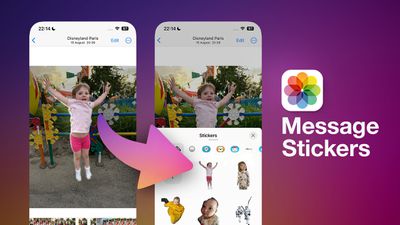
With iOS 17, Apple has taken the feature further by allowing you to export isolated photo subjects as stickers that you can use in Messages. And if the subject is in a Live Photo, the sticker will even animate.

There are a number of effects that can be added to make your digital stickers look more like real stickers, including a white outline, comic-like shading, a puffy 3D look, and a shiny, holographic finish. The sticker effects will animate and reflect the light appropriately, making your self-created stickers look professionally done.

The following steps show you how to create your first photo-sourced sticker in iOS 17.

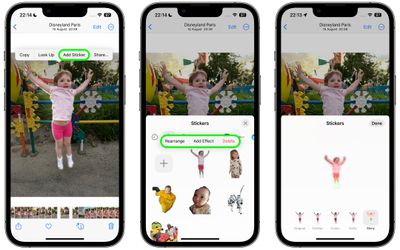
  1. Launch the Photos app and select an image from your library containing a well-defined subject.
  2. Press and hold on the subject until it ripples and a white glow flows around its outline.
  3. In the popup menu that appears, tap Add Sticker.
  4. To change the look of your sticker, tap Add Effect, and you'll be given several options including Original, Outline, Comic, Puffy, and Shiny.
  5. Tap Done to finish.

photos

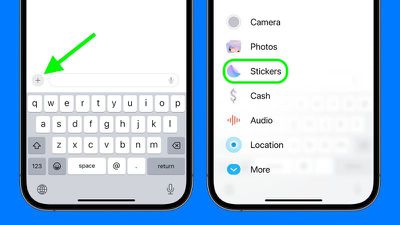
That's all you need to do. The next time you open Messages, you'll find it in your personal stickers collection, ready to send to friends and family. To use it in a Messages conversation thread, simply tap the + button next to the compose field, then tap Stickers.
stickers
Tap the sticker in question, then tap the Send button. Alternatively, you can long-press the sticker and drag it into the conversation, or even onto a specific message bubble, just like a tapback reaction.

In iOS 17, Apple has added several new features to its Messages app to make communicating with other Apple users more creative and fun. Check out our dedicated Messages roundup to learn else is in store when iOS 17 is publicly released next month.


Top Rated Comments

fatTribble Avatar
36 months ago
I’m going to make an animated sticker of Scotty beaming me up! 🤓
Score: 5 Votes (Like | Disagree)
36 months ago
Good article. Nice feature of iOS 17!
Score: 3 Votes (Like | Disagree)
36 months ago
Never really used stickers before but I really want to try this out.
Score: 2 Votes (Like | Disagree)
alexandr Avatar
36 months ago

I think it will be open as Memoji Stickers, just devs can’t add it yet as it’s not released yet
Would be great, if that's the case. Making similar stickers for Telegram is a chore!
Score: 2 Votes (Like | Disagree)
jdavid_rp Avatar
36 months ago

I wish you could use these stickers in different apps too.
I think it will be open as Memoji Stickers, just devs can’t add it yet as it’s not released yet
Score: 2 Votes (Like | Disagree)
klasma Avatar
36 months ago

Did you set up a go fund me for you poor child?
It’s a MacRumors editor’s child I think, so you’ll have to ask them.
Score: 2 Votes (Like | Disagree)

Popular Stories

macOS 27 on MacBook Pro

Apple Says macOS 27 Won't Be Compatible With These Macs

Wednesday June 3, 2026 8:29 am PDT by
During WWDC 2025, Apple revealed that macOS 26 Tahoe would be the final major macOS version for Intel-based Macs. macOS 27 will be compatible with Apple silicon Macs only, meaning that you will need a Mac with an M-series chip or a MacBook Neo with an A18 Pro chip in order to install the software update. Apple will unveil macOS 27 during its WWDC 2026 keynote this Monday, June 8, and the...
MacBook Neo on Yellow Feature

MacBook Neo is So Popular That Apple Reportedly Doubled Production

Wednesday June 3, 2026 9:24 am PDT by
On an earnings call in late April, Apple's CEO Tim Cook said that customer response to the MacBook Neo was "off the charts," and the popularity of the laptop has reportedly led the company to significantly boost production. Apple supply chain analyst Ming-Chi Kuo this week said he believes that MacBook Neo shipments to Apple were doubled from an initial target of 5 million units to 10...
iphone 18 pro blue%402x

iPhone 18 Pro: Dark Cherry, Light Blue, and Dark Gray Chassis Leaked [Update]

Thursday June 4, 2026 5:18 am PDT by
Update: Since publication, new information has come to light suggesting the images have been AI-manipulated and are not in fact iPhone 18 Pro chassis parts. The original article follows. The color options Apple is reportedly planning for the upcoming iPhone 18 Pro and ‌iPhone 18 Pro‌ Max have appeared online today in the form of images of chassis parts of unknown authenticity....