

iPhone 7: How to Hard Reset - MacRumorsOpen MenuShow RoundupsShow Forums menuVisit ForumsOpen Sidebar
Skip to Content

iPhone 7: How to Hard Reset

by

If your iPhone 7 or iPhone 7 Plus is acting up and needs a quick restart, you can follow these steps to force it to reboot without the need to shut it down.

The iPhone 7 and iPhone 7 Plus feature a haptic Home button rather than a physical Home button, so forcing a restart is different than on earlier devices. It's also different than restarting an iPhone 8 or later.
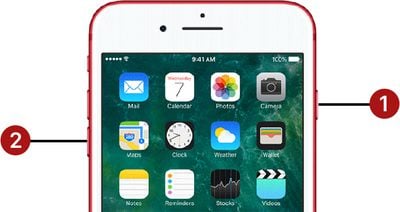
hard reset buttons iphone 7

How to Force Restart (Hard Reset) iPhone 7

To force restart an iPhone 7 or iPhone 7 Plus, follow these three simple steps.

  1. Hold down the Volume Down button on the left side of the device and the Sleep/Wake button on the right side of the device at the same time.
  2. Now, hold the buttons for approximately 10 seconds until the screen goes dark and an Apple logo appears on the screen.

  3. Release the buttons and wait while you iPhone restarts.

You can also hold down the Sleep/Wake or Side button on the device to bring up a screen that will let you shut down the iPhone entirely. The same option appears as part of the Emergency SOS screen if you press the Side button a total of five times.

Finally, if you open up the Settings app and go to the General section, you can scroll all the way to the bottom to find a "Shut Down" option.


Popular Stories

iCloud iPhone 17 Pro

iPhone Users Who Pay for iCloud Storage Get Two New Perks on iOS 27

Thursday July 2, 2026 6:10 am PDT by
If you pay for certain iCloud+ storage plans beyond the 5GB that Apple offers for free, you will receive two more perks on iOS 27 at no additional cost. A summary of the two new iCloud+ perks on iOS 27:Increased daily usage limits for some new Apple Intelligence features, including image generation in the revamped Image Playground app. HomeKit Secure Video cameras receive generated video...
American Express Gold Apple Pay Feature

American Express Announces New Apple Pay Feature

Tuesday June 30, 2026 10:27 am PDT by
American Express today announced that you can now redeem Membership Rewards points when checking out with Apple Pay on the web and in apps on the iPhone and iPad. When checking out with Apple Pay on iOS 18 or iPadOS 18 or later, tap on your eligible American Express card (Platinum, Gold, Green, and others) and select the Membership Rewards points option. You can use points to cover all or...
series 10 apple watch titanium digital crown

Report: Apple Watch Redesign Coming Next Year With New Band System

Tuesday June 30, 2026 8:45 am PDT by
A "major overhaul" of the Apple Watch's design is due to arrive next year with a new system for connecting bands, according to a known Weibo leaker. In a set of recent posts, the leaker known as "Instant Digital" linked the new claim to older rumors about an "Apple Watch X" model, which was said to introduce a fresh design and break compatibility with the existing watch band system. Citing...













