

There are a number of things you can try if your Apple Watch stops responding for whatever reason. This article outlines your options.
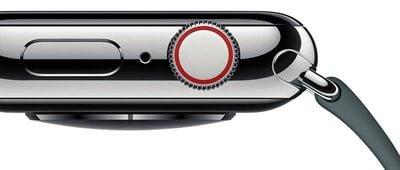
The first and most straightforward solution is to reset your Apple Watch, which is basically a way of turning it off and on again. This is useful if, say, an app has crashed and a standard force quit doesn't work, or if the live data transfer between your iPhone and Apple Watch seems inconsistent.
Note that you can't restart an Apple Watch if it is charging, so undock it first before attempting the following steps.
How to Restart an Apple Watch
- Press and hold the side button until you see the Power Off slider on the screen.
- Drag the Power Off slider with your finger.
- Once your Apple Watch has turned off, press and hold the side button again until you see the Apple logo.

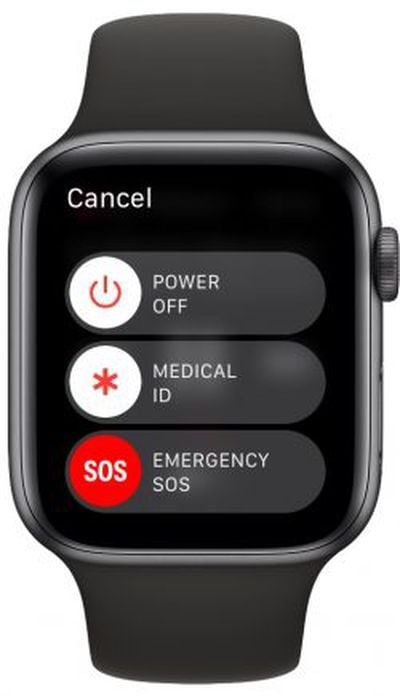
If that didn't solve your issue, you can try a force restart on your Apple Watch. Note that this should only be used as a last resort. And whatever you do, don't perform a force restart if your Apple Watch is in the middle of an OS update.
How to Hard Reset an Apple Watch
- Press and hold both the side button and Digital Crown for at least 10 seconds.
- Release both buttons when you see the Apple logo.
What to Do if You Forget Your Passcode
If you forget your Apple Watch passcode, you'll need to erase the device and then restore from a backup. You can perform this action by launching the Watch app on your paired iPhone: tap the My Watch tab if it's not already selected, tap General -> Reset, then select Erase Apple Watch Content and Settings .
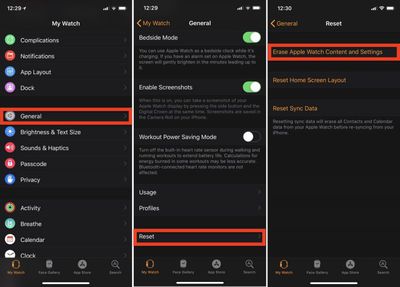
Alternatively, you can start the erase and restore process on your Apple Watch by connecting the device to its charger and following these steps.
- Press and hold the side button until you see the Power Off screen.
- Hard press the Power Off slider and then let go.
- Tap Erase all content and settings.
- You'll be asked to set up your Apple Watch again when the process ends. When you do, be sure to restore from a backup.















