

iPhone 8: How to Hard Reset or Force Restart - MacRumorsOpen MenuShow RoundupsShow Forums menuVisit ForumsOpen Sidebar
Skip to Content

iPhone 8: How to Hard Reset or Force Restart

by

Apple in 2017 changed the method to force restart or hard reset an iPhone 8 or iPhone 8 Plus.

While rebooting an iPhone 7 or iPhone 7 Plus requires pressing and holding both the Sleep/Wake and Volume Down buttons for at least 10 seconds until the Apple logo appears, restarting an iPhone 8 or iPhone 8 Plus is a three step process that involves the Volume Up button, the Volume Down button, and the Side button on the device.
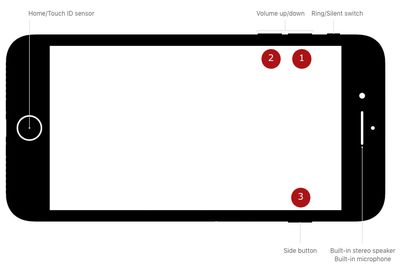
force hard reset iPhone 8 buttons

How to Force Restart (Hard Reset) iPhone 8

First, you need to press and quickly release the Volume Up button. Then, press and quickly release the Volume Down button. Finally, press and hold the Side button (aka power) until you see the Apple logo.

Powering off regularly still requires holding down the Side button for a few seconds until the "slide to power off" prompt appears. In iOS 11 and iOS 12, there's also a "Shut Down" option in the Settings app at the bottom of the General menu.

Apple made this change because on iPhone 8 and iPhone 8 Plus, pressing and holding the Side aka Sleep/Wake button and one of the Volume buttons now activates the Emergency SOS feature.


Top Rated Comments

goshya Avatar
115 months ago
What the...?

What was wrong with pressing the side button and volume button simultaneously?

Ridiculous combination.
Score: 31 Votes (Like | Disagree)
115 months ago
This feels like the Konami code of Apple.
Score: 23 Votes (Like | Disagree)
IG88 Avatar
115 months ago
What the...?

What was wrong with pressing the side button and volume button simultaneously?

Ridiculous combination.
It takes courage to take something simple and make it much more complicated.
[doublepost=1506188092][/doublepost]
This feels like the Konami code of Apple.
IPhone X procedure:
Vol up
Vol dn
Vol up
Vol dn
Side
Side
Wax on
Wax off
Sand floor
Paint fence
Sweep leg
Score: 22 Votes (Like | Disagree)
Mlrollin91 Avatar
115 months ago
Cuz it's too easy to accidentally do on the plus when you're trying to just press the power button when using one hand.
How is it to easy? You are not holding the buttons down for 10 seconds when trying to only lock your screen one handed. I have never once accidentally hard reset my device.
Score: 21 Votes (Like | Disagree)
115 months ago
With iOS 11 that activates the SOS mode.

https://support.apple.com/en-us/HT208076
I'm so confused. I thought pressing five times on the power button did that.

Or is that clicking the heels on your ruby slippers while chanting "There's no place like home"?

Oh wait, no, it's "You put your left foot in, you put your left foot out, you put your left foot in and you shake it all around, you do the hokey Pokey...". No that's not it either.

Damn you, Apple! :mad: It used to be so simple!
Score: 11 Votes (Like | Disagree)
simonmet Avatar
115 months ago
With iOS 11 that activates the SOS mode.

https://support.apple.com/en-us/HT208076
Pressing the sleep/wake button 5 times rapidly activates SOS on the 7 Plus.

The iPhone 7 and 8 have the same physical layout so why have they broken consistency?
Score: 11 Votes (Like | Disagree)

Popular Stories

iCloud iPhone 17 Pro

iPhone Users Who Pay for iCloud Storage Get Two New Perks on iOS 27

Thursday July 2, 2026 6:10 am PDT by
If you pay for certain iCloud+ storage plans beyond the 5GB that Apple offers for free, you will receive two more perks on iOS 27 at no additional cost. A summary of the two new iCloud+ perks on iOS 27:Increased daily usage limits for some new Apple Intelligence features, including image generation in the revamped Image Playground app. HomeKit Secure Video cameras receive generated video...
iPhone 4 on Black Feature

Apple Facing One of Its Worst Leaks Since the iPhone 4

Thursday July 2, 2026 9:53 am PDT by
Apple supplier Tata Electronics recently suffered a cyberattack that resulted in thousands of confidential files being published on the dark web, and this reportedly included some photos and documents related to the upcoming iPhone 18 Pro. We have elected not to share any of the leaked photos in this story due to the illegal nature in which they were obtained, but they can easily be found...
American Express Gold Apple Pay Feature

American Express Announces New Apple Pay Feature

Tuesday June 30, 2026 10:27 am PDT by
American Express today announced that you can now redeem Membership Rewards points when checking out with Apple Pay on the web and in apps on the iPhone and iPad. When checking out with Apple Pay on iOS 18 or iPadOS 18 or later, tap on your eligible American Express card (Platinum, Gold, Green, and others) and select the Membership Rewards points option. You can use points to cover all or...















