

iPad Pro: How to Hard Reset or Shut Down - MacRumorsOpen MenuShow RoundupsShow Forums menuVisit ForumsOpen Sidebar
Skip to Content

iPad Pro: How to Hard Reset or Shut Down

by

Apple's iPad Pro models, available in 11 or 12.9-inch size options, feature edge-to-edge displays with no Home buttons included. The lack of a Home button has resulted in some re-mapped gestures and features, with Apple introducing new restart, shut down, and force restart methods in the tablets.

A shut down and a restart are the same gesture now, while a force restart, used if a regular restart won't work, is a bit different.

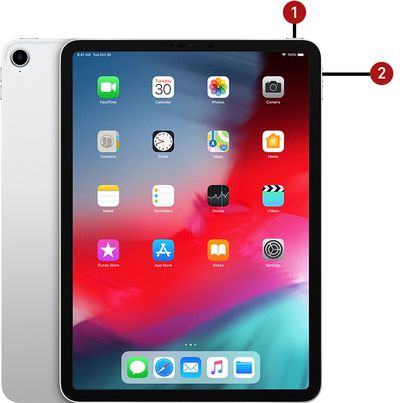
To Shut Down/Restart Your iPad
ipadprorestart

  1. Press and hold down on the top button and either the volume up or volume down button until a slider appears.
  2. Slide a finger along the slider to turn off the iPad.
  3. Once it's turned off, press and hold on the top button again until the Apple logo appears.

On previous devices, you could restart by holding down the home button and the side button on a device at the same time, but in the new models, you need to do a full shutdown and then power the tablet back up in a separate step.

You can also turn off your iPad by opening up the Settings app, choosing General, and selecting "Shut Down."

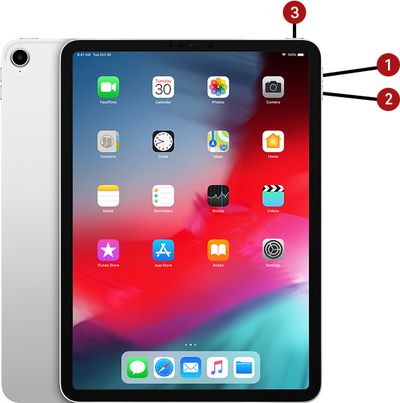
To Force Restart Your iPad
ipadproforcerestart

  1. Press and quickly release the volume up button.
  2. Press and quickly release the volume down button.
  3. Press and hold the Power button until a restart is initiated.

All of the gestures used in the new iPad Pro models are the same as the gestures used in the iPhone X and later, so you can also follow these same steps to shut down or restart an iPhone without a Home button with one small tweak - you'll need to hold the Side button on the right because there is no top power button.


Related Roundup: iPad Pro
Buyer's Guide: iPad Pro (Neutral)

Popular Stories

iPad Pro 2024 Space Black

Apple Has Likely Abandoned 'iPad Ultra' Plans

Wednesday April 29, 2026 10:30 am PDT by
Apple has reportedly abandoned plans for a foldable "iPad Ultra" following years of disappointing sales performance for the iPad Pro. The claim predominantly comes from the Weibo leaker known as "Instant Digital," who posted the remark in response to a question about whether the iPad would join a rumored "Ultra" series of Apple devices. Instant Digital listed the Apple Watch Ultra, M-series...
Apple Card iPhone 16 Pro Feature

Apple Card Promo to Offer Free AirPods Pro 3

Friday May 15, 2026 8:59 am PDT by
Starting as early as next week, customers who sign up for an Apple Card at Apple's retail stores in the U.S. will receive $249 cash back when they purchase AirPods Pro 3, according to Bloomberg's Mark Gurman. The promotion has yet to be officially announced by Apple, so exact terms and conditions are not available at this time. AirPods Pro 3 are priced at $249 in the U.S., so customers who...
Apple WWDC25 iOS 26 CarPlay Light mode 250609

Six Popular iPhone Apps Now Available on CarPlay

Thursday May 14, 2026 9:10 am PDT by
Apple's CarPlay system for accessing iPhone apps on a vehicle's dashboard screen has received six popular apps in recent weeks: ChatGPT, Perplexity, Grok, Google Meet, WhatsApp, and the indie artist streaming platform Audiomack. Make sure you have the latest version of each app and they will automatically appear on CarPlay. ChatGPT Starting with iOS 26.4, CarPlay supports voice-based...













